
Responsive HTML5 Merged Project - TOC Parent Topic Links Not Correct in Mobile Views
There was a thread two years ago on this that was never answered (here: Re: TOC links in Responsive HTML5 layouts are inaccurate with merged projects ). I'm not sure how often people review old topics so I'm creating a new one because I'm desperate for an answer to this problem:
My set up: RoboHelp HTML 11 (version 11.0.4.291) on a Windows 7 OS. I merged this project using instructions on peter grainge's amazing website (Merging WebHelp - RoboHelp 9 and 10).
I also manually disabled the glossary functions in my Screen Layout.
Here is a more detail explanation of the problem:
ONLY in Tablet or Phone view does this problem occur. Everything works 100% in Desktop view:
PROBLEM:
In tablet or phone view, I click on a parent topic that has a few nested child topics inside of it. Once the list of nested child topics displays, I have the option to click on the parent topic that actually triggered the expansion and display of the child topics, OR any one of the child topics. When I click that PARENT topic, it should open that topic in the layout ... instead I get a "file cannot be found" page (see images below).
When I hover my mouse over that parent topic to see URL destination of that topic, it displays the WRONG file path. Instead of pointing to the folder INSIDE of the "mergedProjects" folder that contains the parent topic that needs to be opened, it points inside of the parent DIRECTORY, looking for the folder that contains the parent topic to be opened. since it cannot find that folder and parent topic, I get a "file cannot be found" page whenever I click the topic.
Topics that are NOT parent topics of child topics correctly point to the folder inside of the "mergedProjects" folder that contains the desired topic of that child project. ONLY parent topics of child topics point to the wrong destination.
Note in the following image: This parent topic in TABLET VIEW points to the directory that contains the "shell" parent help system for all of the other child help systems found in the "MergedProjects" folder.
The file path of the parent topic in the image below is:
"file///C:/RoboHelp Projects/New Folder/ [OMITTED]_Installation_and_Configuration_Guide/ID_IC_System_Req/System_Requirements.htm"
** The "New Folder" is the folder I'm publishing the entire web help to.**
Note that it is NOT pointing to the "mergedProjects" folder that contains the help system which contains this child project. It's pointing one level above that:
image1:
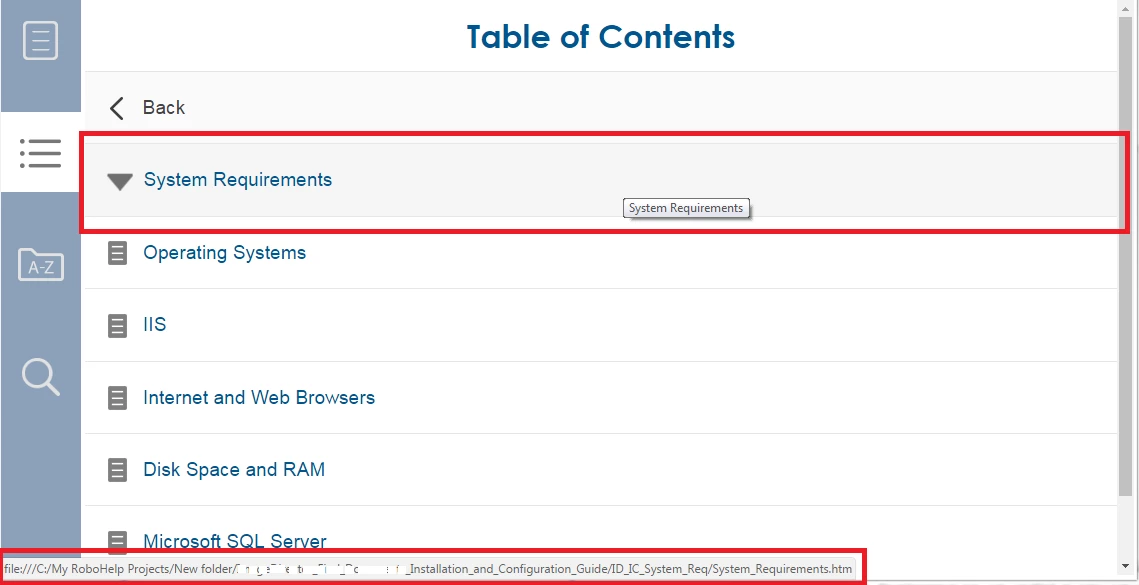
If I click the parent topic "System Requirements," I receive a page stating the topic cannot be found. This is true, because this topic is REALLY located in a sub folder of a child project in the "mergedProjects" folder.
If I click the child topic named "Operating Systems" UNDER the "System Requirements" parent topic, it goes to the correct destination without any issues.
If I hover my cursor on the child topic, I see the CORRECT file path to the topic:
"file///C:/RoboHelp Projects/New Folder/mergedProjects/IDICHelp/ [OMITTED]_Installation_and_Configuration_Guide/ID_IC_System_Req/Operating_systems.htm"
**The "New Folder" is the folder I'm publishing the entire web help to ... note that it is pointing to the child project folders inside of the "mergedProjects" folder as desired.**
image 2:
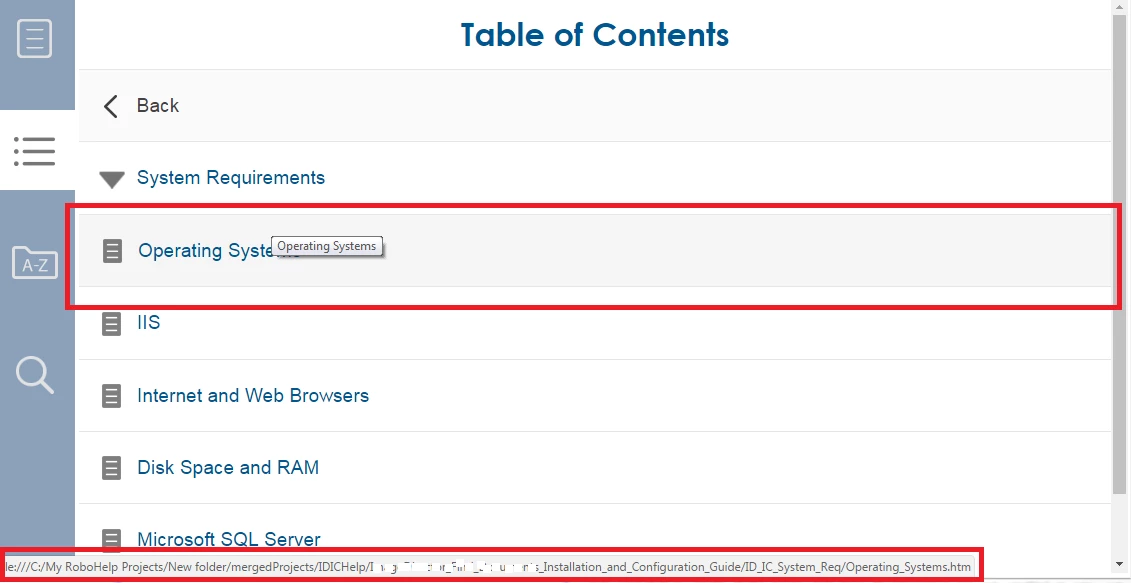
This problem is true for ALL topics that are parents of child topics in merged help. Desktop view works fine and the file path destinations are correct.
Any help out there????? I'm lost. Thank you!


 AdChoices