


Known Participant
September 24, 2021
Question

Restart Numbering Not Working - Edge Output

  • September 24, 2021
  • 10 replies
  • 481 views

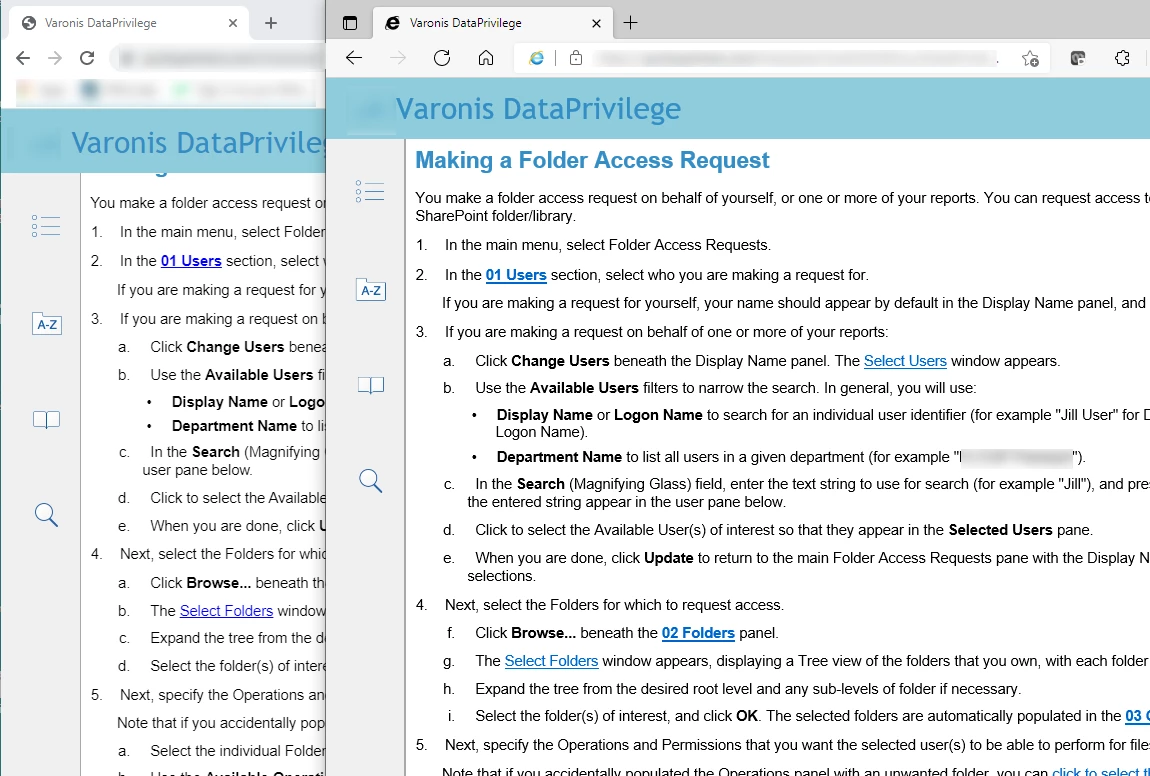
Generated my help system, and the restart numbering feature/code does not seem to work in Edge (v93.0.961.52 - official build - 64-bit). Works fine in Chrome, which does not help me as Edge is our company default browser. Not sure if Edge is set to operate in IE compatibility mode (I turned it off, but it did not seem to make a difference). Screenshot below from same output. 
 

    This topic has been closed for replies.

    10 replies

    Peter Grainge
    Community Expert
    Community Expert
    September 24, 2021

    If you cannot resolve it and cannot share, then I think your only option is support. See https://helpx.adobe.com/contact/enterprise-support.other.html#robohelp for your Adobe Support options. The email link tcssup@adobe.com is recommended as it reaches a team dedicated to Technical Communication Suite products including RoboHelp.


    They may well require access to your machine or the project so good luck with that. You will have to involve IT.

    ________________________________________________________
    See www.grainge.org for free Authoring and RoboHelp Information


    Use the menu (bottom right) to mark the Best Answer or Highlight particularly useful replies. Found the answer elsewhere? Share it here.
    Known Participant
    September 24, 2021

    SharePoint OUTPUT (not Outlook).... Damned misfiring synapses.

    Known Participant
    September 24, 2021

    Hi Peter,

    First - thanks for your offer, but corporate security prevents me from uploading to a drop-box type site.

    I have done as you suggested and created a new project, importing the offending topic and .CSS/skin files.

    I am not sure what you mean by "Author View" - if you mean the "preview" in Author View, it looks fine.

    The one variable that I neglected to mention that might have some bearing is that I am viewing SharePoint (.aspx) outlook, as this is uploaded onto our corporate helpdesk site. Trying again with the test project - same result. Looks fine in Chrome (restarts numbering) but not Edge (sequence continues).

    If I open the LOCAL output (HTML5) the numbering looks fine in both Chrome AND Edge, so - anecdotally - it appears that it may be connected to SharePoint's interpretation of the output. 

    Cheers

    Participant
    March 8, 2022

    Hi,

    Have you resolved this issue? If so how? I am on 2020 update 6 and having the same issue in Edge only. Chrome is fine. Unfortunately, Edge is the recommended corporate browser. Any suggestions would be appreciated.

    Jeff_Coatsworth
    Community Expert
    Community Expert
    March 8, 2022

    Supposedly it worked locally, but not on the server - is that your situation too? Have you considered Patch 7 may fix it?

    Peter Grainge
    Community Expert
    Community Expert
    September 24, 2021

    I have run a couple more tests in other projects and have not encountered the issue I found. That one is something I will look into more tomorrow but it looks now to have been a one off glitch.


    That leaves your issue unresolved. Create a new project and import that topic along with its CSS.

    • Does it still show that error?
    • Is it the same in author view before you generate?


    I will happily look at that project one topic project. You can change the text to garbage if it is confidential. See the Contact page on my site and send the project as instructed there. Do make sure you include a link to this thread and please do not email the project direct.

    ________________________________________________________
    See www.grainge.org for free Authoring and RoboHelp Information

    Use the menu (bottom right) to mark the Best Answer or Highlight particularly useful replies. Found the answer elsewhere? Share it here.
    Peter Grainge
    Community Expert
    Community Expert
    September 24, 2021

    Lists are tagged <li>, your code is tagged "p" 

    ________________________________________________________
    See www.grainge.org for free Authoring and RoboHelp Information

    Use the menu (bottom right) to mark the Best Answer or Highlight particularly useful replies. Found the answer elsewhere? Share it here.
    Peter Grainge
    Community Expert
    Community Expert
    September 24, 2021

    That's an numbered paragraph rather than a numbered list but I suspect the counter-set change is involved. You can try changing set to reset but I don't think that will help.


    I have sent an email to Adobe but I doubt I will hear back until Monday. I will update this thread as soon as I know more.


    Alternatively you can try Support but I think they will be liaising with the people I have contacted.


    See https://helpx.adobe.com/contact/enterprise-support.other.html#robohelp for your Adobe Support options. The email link tcssup@adobe.com is recommended as it reaches a team dedicated to Technical Communication Suite products including RoboHelp. 

    ________________________________________________________
    See www.grainge.org for free Authoring and RoboHelp Information

    Use the menu (bottom right) to mark the Best Answer or Highlight particularly useful replies. Found the answer elsewhere? Share it here.
    Known Participant
    September 24, 2021

    This appears to be the offending code (p\.num_a1 0;)


    <p class="num_1">Next, select the Folders for which to request access.</p>
    <p class="num_a" style="counter-set: p\.num_a1 0;">Click <span style="font-weight:bold;">Browse...</span> beneath the <span style="font-weight:bold;"><a class="dropspot" data-rhwidget="DropSpot" data-target="drop-down9" href="#">02 Folders</a></span> panel.</p>


    I will note that there are two separate styles for numbering (it's not a single auto-number list format). It's Level 1 numbering for two different list styles (one for alpha and one for numeric)

    Peter Grainge
    Community Expert
    Community Expert
    September 24, 2021

    I have just done a quick test and there does seem to be a problem but a different one to what you are reporting. For me by restarting the equivalent of 4f, I then see numbers instead of letter.


    It has the feel of the change having messed something up. Let us know what code you see. I will test a bit more in the morning and take it up with Adobe.

    ________________________________________________________
    See www.grainge.org for free Authoring and RoboHelp Information

    Use the menu (bottom right) to mark the Best Answer or Highlight particularly useful replies. Found the answer elsewhere? Share it here.
    Peter Grainge
    Community Expert
    Community Expert
    September 24, 2021

    Look at the code behind 4f. Does it say Counter Reset or Counter Set? See List numbering problems in Firefox. I need to update that as I know Adobe have changed how that works in Update 6 and it now needs to read counter set.


    However, the issue was only with Firefox so that shouldn't be the cause. It's possible the change is having a different effect.


    Take a look and post back.

    ________________________________________________________
    See www.grainge.org for free Authoring and RoboHelp Information

    Use the menu (bottom right) to mark the Best Answer or Highlight particularly useful replies. Found the answer elsewhere? Share it here.
    Known Participant
    September 24, 2021

    Sorry - forgot to specify that it is latest RoboHelp verson: Version 2020.6.76