
Inspiring
July 11, 2013
Question

RH 10 index issue with IE 10

  • July 11, 2013
  • 1 reply
  • 2281 views

I have RH 10.  I applied the patch to generate output files for IE 10.  Links for index key words assigned to more than one topic do not display correctly for me in IE 10....
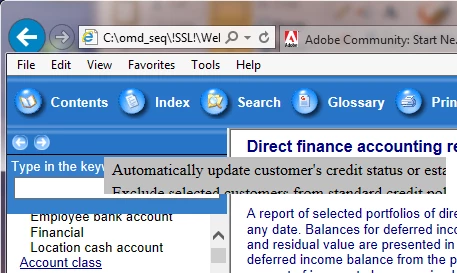
In the above image, "Account class" has two linked topics.  The gray box displaying the topics no longer has the border it had in IE 8, the font size is larger than it was previously, the text of both topics is truncated on the right, and only part of the second topic is visible.  The image below shows the same info in IE 8 compatibility mode.

Similar issues occur if more than two topics exist.  Has anyone else run into this?  Is there a resolution for it?  Thanks!

Tim

This topic has been closed for replies.

1 reply

Known Participant
July 12, 2013

Sorry, Tim - I don't have an answer.  But another question possibly related - to my WebHelp Index in IE 10 from RoboHelp 10.  So, I'm "piggy-backing" here on your thread, and hopefully we will both get answers.  Actually, it's possible that maybe the solution will get us both our answers.

When I launch my RH10-generated WebHelp in IE 10 browser, I am prompted by IE whether to "Accept blocked content", because IE was retricting the web page from running scripts or ActiveX controls.  I'm assuming that the scripts and ActiveX controls are related to DHTML and/or the Index.

So, when I ignore this prompt (and not accept blocked content), the result is that my Index looks fine, BUT my DHTML drop-down text does not work.

HOWEVER...

When I click button to Accept Blocked Content when prompted, my DHTML drop-downs work correctly.  But my Index looks bad (see below screenshot)

So, now I need help.  My DHTML drop-downs are essential to the Help - they contain all our steps and are all throughout.  However, it would be nice to have an Index in the correct font - which I believe was set to 9 pt. 

How do I control the font size used in Contents, Index, and Search??  I was looking in the whibody.htm file, but did not see any clues there.

Perhaps if Tim and I can get an answer about which RoboHelp files to check and modify to change the appearance of the Index entries, it would help us troubleshoot and resolve both problems.

BTW - I did look at the Skin Editor, and the font size was set at 9 pt.

Thanks!

Known Participant
July 12, 2013

A developer here helped me realize what the font problem was. Before, the Contents tab was showing another very big font.  In the Skin Editor, I had selected Arial 9 pt as the size. He said that Arial is not a good font for the Web, and so IE 10.  He said that if the Web (IE 10 here) does not recognize Arial 9 pt, it will try to resolve it to another font - thus my results above.  He said that Tahoma or Verdana were better fonts for the Web.

So, I changed the font in the Skin Editor for the Navigation to be Tahoma 10 pt.  And now the Contents tab is appearing with the normal, correct size font.

The Index is the correct font size now, but showing up bold.  So more tweaks are now needed.

That's my update (resolution?) - but not sure it helped you, Tim.

Inspiring
July 12, 2013

Freespirit-ST,  I used the Skin Editor to switch all fonts to Tahoma and then to Verdana.  No change.

Note: Even though the Skin Editor (see below) shows the correct font applied to the Index topics, the generated project is still using Arial (above) for the index topics.

I also noticed that the background color of the selected item (light blue behind selected topic in bottom image) is also not being applied to the generated output (Account Class in top image is underlined but does not have the light-blue background).

Glad changing the fonts helped with your Contents tab issue.  RH 10 does still seem to need more tweaking for IE 10.

Tim