
ROBOPM
Inspiring
March 6, 2018
Answered

Rh (11 and 2017) overrides Word (2013 or 2017) Template (dot or .dotm) Page Setup > Layout settings

  • March 6, 2018
  • 1 reply
  • 624 views

Hello all,

Problem: After Rh generates a printed document (SSL - Use Styles from: Microsoft Word Template), it looks as if Rh overrides the document Word Page Setup/Layout settings. (Note: While investigating the issue, this looks like an issue for a long time since it happens in Rh 11 and Rh 2017)

  1. Does anyone know of a workaround?
  2. Does this issue hold water, hence, bug report to Adobe?

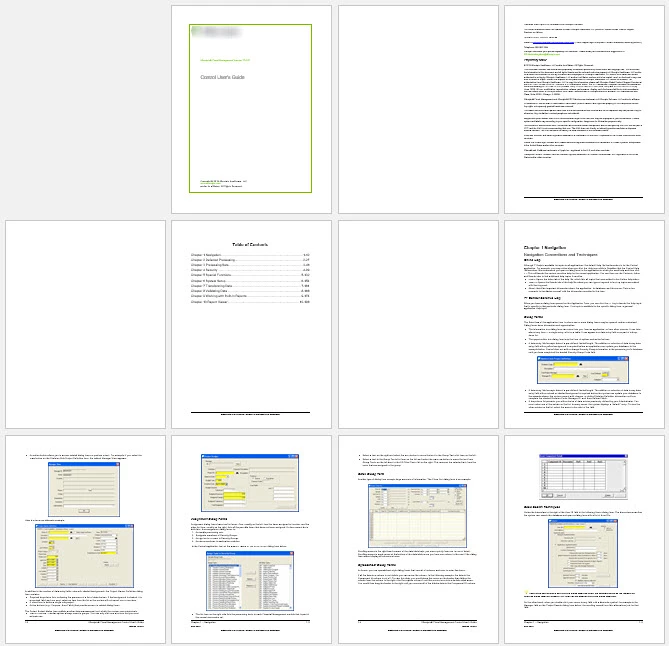
Expected Results: There should be no blank page after my cover page, TOC, and no blank pages between chapters.

My Rh SSL Advanced Options Settings
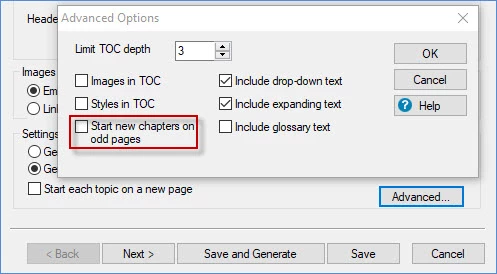

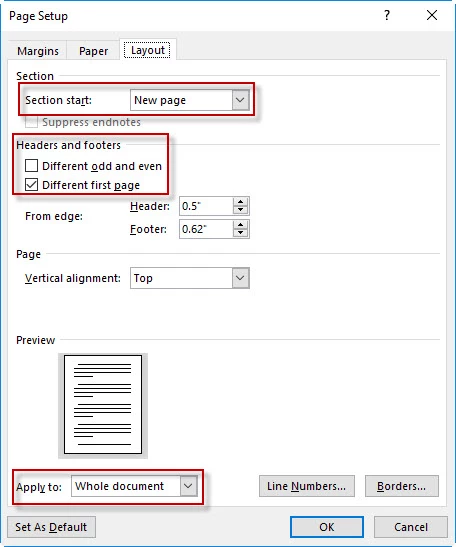
My MS Word Template


   BEFORE (Settings in my Word Template Layout tab > Page Setup > Layout Tab).                            
  

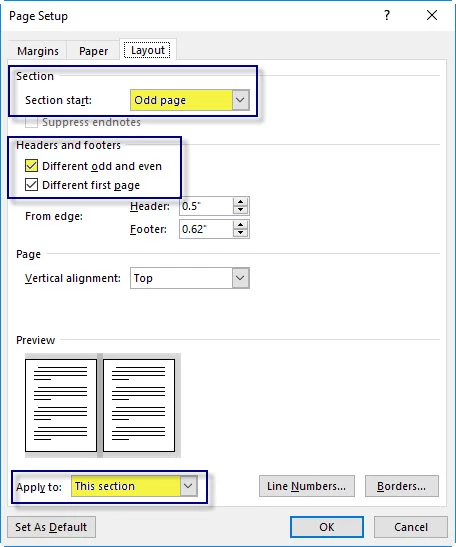
         AFTER (Settings in my Word Template Layout tab > Page Setup > Layout Tab).    
  

CURRENT OUTPUT
EXPECTED OUTPUT (Below, shows after when I manually change back to my settings that I have previously saved in my Template.)

Thank You!

~~PM

This topic has been closed for replies.
Correct answer Peter Grainge

POST 3 in thread

New print setup would deal with those issues.

POST 4 in thread

Not the same thing but I was thinking of a Word issue that further digging suggests no longer occurs.

POST 5 in thread

The project I had was designated AP. Send me latest anyway and tell me which Print Output will show give blank pages.


See www.grainge.org for free RoboHelp and Authoring information.

@petergrainge


After some offline exchanges we established that the blank pages are somehow coming from Robopm's template when it runs some macros after generating the document. So whilst the section settings are getting changed that is not impacting the output.


See www.grainge.org for free RoboHelp and Authoring information.

@petergrainge

1 reply

Peter Grainge
Community Expert
Community Expert
March 7, 2018

I had not yet deleted the copy of your project so I looked at your settings. I see you are not using the new print options to apply different headers and footers and use your own cover page etc. See the RoboHelp Tour for information on that. The link will take you to the relevant page.

I am not saying it will fix the problem but you would need to try that before reporting a bug. I haven't checked it is happening to me.

I recall having some odd results that were fixed by removing a small image that was apparently not doing anything that would cause a blank page to appear. Styles that have Page Break Before could possibly cause issues. Different Front Page is also worth disabling to test.

Very difficult to track this sort of thing and probably a lot less time changing the settings than finding the cause.


See www.grainge.org for free RoboHelp and Authoring information.

@petergrainge

Use the menu (bottom right) to mark the Best Answer or Highlight particularly useful replies. Found the answer elsewhere? Share it here.
Peter Grainge
Community Expert
Community Expert
March 7, 2018

Using your flexi template, it is changing New Page to Odd page but it is not giving me any blank pages!

If you send the document to a printer, do you get blank pages then?


See www.grainge.org for free RoboHelp and Authoring information.

@petergrainge

Use the menu (bottom right) to mark the Best Answer or Highlight particularly useful replies. Found the answer elsewhere? Share it here.
ROBOPM
ROBOPMAuthor
Inspiring
March 7, 2018

I can see it in Print Preview, like the screenshots above. I can also see them (blank pages) after saving the file to PDF, which is the media the customer receives (PDF).