
Participating Frequently
January 14, 2015
Question

RH 11: Is there a responsive .css?

  • January 14, 2015
  • 1 reply
  • 468 views

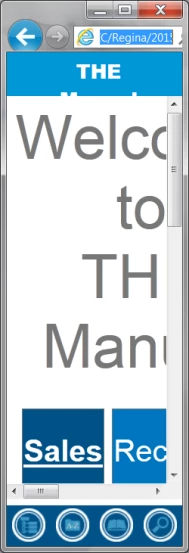
Should a responsive .css be used for Responsive HTML projects? My H1, H2 etc. headers stay the same size and look way too large for mobile viewing.

You need to change the sizing of graphics and tables to percentages in order for them to adjust…but what about the general .css
formatting?


Are there .css guidelines for responsive projects so that everything adjusts properly for viewing on different size devices? How is it
done?


Any help appreciated. I’m using Adobe RoboHelp 11.013.268
 

This topic has been closed for replies.

1 reply

Captiv8r
Legend
January 14, 2015

I'd suggest editing the CSS to specify 100% for your Headings as well as the body font. It's a simple thing to try if you don't wish to disrupt existing settings. Just create a new CSS and associate it with all the topics. Then generate and test.

Cheers... Rick

Participating Frequently
January 14, 2015

Thanks for responding so fast.

I tried a new CSS with 100% on everything and but it didn’t work. I’ll try other %s and see what happens. Thanks,

Regina Fitzgerald

Peter Grainge
Community Expert
Community Expert
January 15, 2015

Responsive help uses two CSS files, one for the layout itself and one (or more) for the topics.

The layout.css should not be used for the topics and it would be difficult to do so as it does not contain the styles you would use in a topic. I'll assume you are not using that.

Your own CSS should automatically resize and I haven't had any issues with that. Try using the supplied default.css without any modifications to see if the problem goes away. If it does, then you can start comparing styles.

I'm also wondering if there is a resizing issue caused by the images. Try one of the sample projects to see how they work. Click Open on the RoboHelp Starter page and then click Samples in the ribbon on the left.


See www.grainge.org for RoboHelp and Authoring tips

@petergrainge

Use the menu (bottom right) to mark the Best Answer or Highlight particularly useful replies. Found the answer elsewhere? Share it here.