
Inspiring
July 29, 2014
Answered

RH 11: Search and replace in files: options are grayed out

  • July 29, 2014
  • 1 reply
  • 265 views

Hello to all,

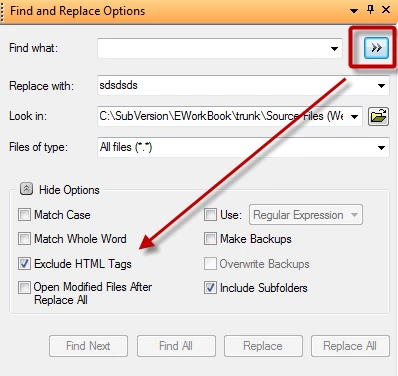
just wanted to replace a string in my RH Project. Using the Dialog "search and replace in files", the Option "ignore HTML-Tags" is grayed out.

Even if i create a new, empty Project: the same Problem.

Is this Option generally not available in RH11 or what is the Trigger to gray the Option out?

Sorry if I dont hit the English terminology used in RH, I'm using the German Version...

Regards,

Julian
This topic has been closed for replies.
Correct answer RoboColum_n_

Hi Julian. This sounds like you have the Advanced options displayed. try going back to the Basic options by clicking the double arrow icon in the top right hand corner:

1 reply

RoboColum_n_
RoboColum_n_Correct answer
Legend
July 29, 2014

Hi Julian. This sounds like you have the Advanced options displayed. try going back to the Basic options by clicking the double arrow icon in the top right hand corner:

Inspiring
July 30, 2014

Thanks a lot, that's it!

Advanced Options were activated (whyever "exclude html" is grayed out then). Switching back to normal mode, "regular expressions" were checked so the "exclude html" option also was grayed out.