
RH 2015 - HTML Help (CHM) Output Errors
In RH 2015 there appears to be a couple of bugs in the HTML Help window editor which creates some issues in the CHM output.
1) In the HTML Help Window editor, when Search is selected and Glossary is deselected the final chm output shows the Search tab labelled as 'Glossary'. This does not happen if both Search and Glossary are selected, where both are correct in the output.
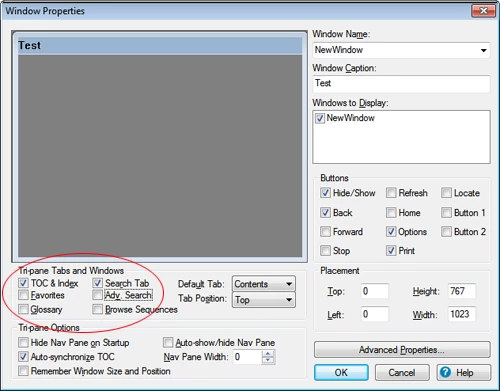
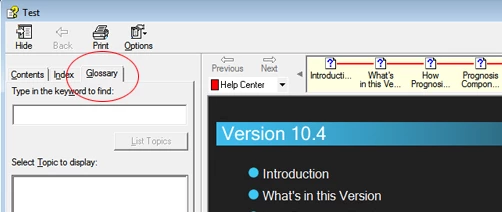
The tab content is actually correct, that is, it contains the search panel, it is just the label that is wrong.
2) The 'Browse Sequences' selection box in the Windows Properties editor does not seem to work. After unchecking the 'Browse Sequence' option, the chm output still shows the ugly browse panel. The only way to remove the panel is to delete any actual Browse Sequence that has been saved in the project.
My projects have been converted over from RoboHelp 11 where all these options performed correctly. I have also tried this with a RH 2015 sample project with the same errors occurring.
I would be interested if anyone else has found the same issues.
Chris


 AdChoices