
Auntie_Em-Pam
Known Participant
January 27, 2016
Question

RH 2015 > nav bar layout corrupt when opening RH11 project

  • January 27, 2016
  • 1 reply
  • 1398 views

Hi,

I opened my RH11 project in RH 2015, and everything looks good except for my nav bar. My icons have all moved, there is a double scroll bar and arrow buttons appear in the header. Also - did Adobe add scrollbars, because I didn't design this project with scrollbars in it. Is there a way to turn them off?

Below are my before and after nav bars. (Don't worry about topic names, titles and content - I had to remove them before I posted this.) How can I fix this? I hesitate to do anything to the template without help as I might mess up the template.

Thanks,

Pam

Before:
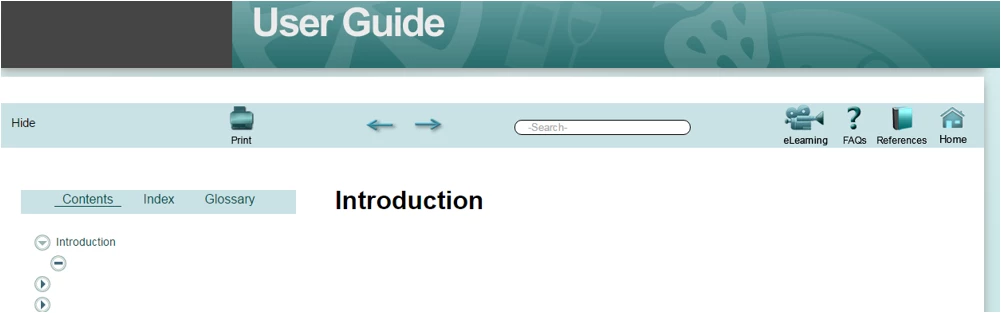
After:

I've just discovered another issue after I scrolled down to the bottom of the project - the placeholder text from the template appears. I searched through other scrollbar issues in the Forum, but can't find how to solve this.

version:  RoboHelp 2015 (12.0.0.306)

template:  Theme2_Government

This topic has been closed for replies.

1 reply

Willam van Weelden
Inspiring
January 30, 2016

The Screen Layout is corrupted. This normally only happens when the .SLP (layout files) is opened in RoboHelp. The easiest solution:

  1. Add the (Government?) layout to the project again. Don't worry about customisations. We're fixing that in the next step.
  2. Go to the !SkinSubFolder! in the Robohelp project.
  3. Go to the folder holding the corrupted skin.
  4. Copy all the image files and the .CSS file. But only those files.
  5. Go the folder holding the newly added skin.
  6. Overwrite the images and CSS file with the copied files.
  7. Generate the project using the new skin.

Does that fix your issue?

Auntie_Em-Pam
Known Participant
January 31, 2016

Willam,

From my backup of the Project:

  • Should I copy the entire Theme2_Government template folder into the !ScreenLayout! folder in my project folder on C:?
  • Or should I just copy the layout files into the existing, corrupted Theme2_Government template folder on C:, i.e. Layout.css, layout.js, layout_1.js?
  • Currently there are two folders in !SkinSubFolder! (in the Project folder on C:); Beautiful_Vista_Flash - which I am not using, and Default which only contains default.skn
  • Thanks,
  • Pam

Community Expert
January 31, 2016

I think that should have been:

2. Go to the !ScreenLayout! in the Robohelp project.

SkinSubFolder is for webhelp skins I believe.

I'd also highlight the following points (because I mis-read initially.):

- re-add the original RH theme to the project from within Robohelp.

- then use Windows Explorer to copy the following from your corrupted layout folder to the newly re-added theme folder: images and css.