
Inspiring
June 14, 2017
Answered

RH 2015 Running Slowly

  • June 14, 2017
  • 1 reply
  • 812 views

My RH 2015 started running slowly earlier this week.  While generating a webhelp project that takes 45 minutes on a slow day (e.g., after closing program, deleting .cpd file, making updates, and generating webhelp) and less than 20 minutes if the project is already open and has been previously generated, RH started randomly displaying "(Not Responding)" on the "Generating WebHelp..." title bar and the system displayed multiple messages with the title "Error" and the message "The operation has timed out".  I could not tell for certain if these messages were tied to RH; there was no other identifying information.  Everything appeared to still be running--over 2 hours when I finally tried to abort the process.  I clicked Cancel and the red X on the title bar with no effect; the animation sequence on the "Generating WebHelp..." window was still going.  I haven't seen that before when RH crashes.  I used Task Manager to close the program, deleted the .cpd file, and tried again.  No good.  I remembered that IT installed BitDefender on my system last Friday.  IT said it should have sped up processing, not slowed it down.  I read the previous post related to fonts.  My rhfontset.apj file is 14 KB.  I haven't tried deleting fonts/font sets yet.  I attempted to close RH again, unsuccessfully, and noticed the project's .ldb (an old Access 98 live database file?) was still open.  I eventually rebooted.  No change.  Recommendations?  Thanks.
This topic has been closed for replies.
Correct answer Peter Grainge

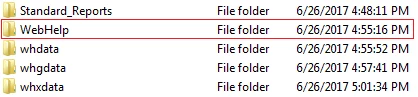
I am publishing to a local folder. Yesterday, I decided to create a duplicate webhelp layout.  I made a copy of the layout that was generating slowly, thought better of making a copy of that layout since it wasn't working properly, tried to delete it, but could not.  The system will not let me delete the copy I made of the webhelp layout.  I created a duplicate from another webhelp layout in the same project, modified it to generate the output I needed, and generated the project.  While it still took a long time to complete, it did complete and the output works; I have what I need for now, but the problem still exists.  When I looked to see if the webhelp folder contained any files I didn't recognize (Peter, I do not see any files in the output folder with the Android extensions listed previously), I noticed that the file count nearly doubled. This morning, I noticed the generated webhelp folder had within it a copy of the same generated webhelp (i.e., webhelp/webhelp, where both folders appeared to contain all the output folders and files).  I wondered if I did anything accidentally that would have put a copy within a copy; I've never seen that before.  I checked the date/time the embedded webhelp folder was created.  The embedded webhelp folder was generated within the time frame that the folders within the main webhelp folder were being generated.  See image below of file folders generated within the main webhelp folder:

I've never seen this before.  Any ideas on what might have caused this behavior?  Aside from deleting the embedded webhelp folder from the generated output, any thoughts on what I might need to do to correct this problem?

Side notes:

  • I was at my daughter's dental appointment while the project was generating yesterday, so I wasn't at my PC to enter any keystrokes during the generation process.  While it's possible, it's quite unlikely that anyone else in my office would have touched my PC.
  • I'm officially on vacation today and out the rest of this week, so it will be a while before I read any replies to this post.

Thanks again in advance for any feedback you might have!


Two main things here.

1] If an output isn't working properly, create a new one, not a duplicate. The latter is duplicating whatever is wrong if it is a layout issue.

2] It sounds like the path you are generating to has got altered somewhere along the line so that you have an output within an output.

Generate to a brand new folder with a brand new layout. Take screenshots of the old one to note the settings.


See www.grainge.org for RoboHelp and Authoring information

@petergrainge

1 reply

Captiv8r
Legend
June 14, 2017

As you say BitDefender was installed at roughly the time this began, have you tried disabling it or uninstalling it to see if things change?

Cheers... Rick

Inspiring
June 26, 2017

Sorry for the delay in writing back. I was able to get the project to generate at that time.  I'm trying to regenerate it now, and I aborted the process after letting it run for over 1 hour with no success.  The issue appears to be tied to one of the webhelp layouts in the project; others have generated successfully.

Regarding BitDefender, yes, it was installed about the same time by our corporate office.  I have not yet requested it be uninstalled; IT has assured me it should not be the issue.

I have noticed the RH project has a lot of files now that I do not recognize.  They appear to be tied to generating an Android phone layout.  The file extensions include: [project_name].sctfdl, .hha, .trb, .trcss, .trf, .trglol, .tridxl, .trk, .trl, .trs, .trtocl, and .trvset.  I Google the .sctfdl file type and found nothing.  I opened the file, and it begins with: <rhpml><ScreenLayouts><ScreenLayout name="Android_Phone_Layout">.  I am the only tech writer currently working on this project.  At least that I am aware of, I did not change any of the project settings or settings for this webhelp layout that would have added support for an Android phone.  I did recently get a new Android phone, and I added an app to the phone to access the Slack channels I use at work.  Any ideas if that process could have somehow added these files to the RH project?  Any thoughts on whether the addition of these files could be the reason for this project's generating slowly?  Any thoughts on how to remove those files from the project?  Note: After aborting the last run, I deleted all the files listed above along with the project's .cpd file.  The system regenerated all of them.  Thanks for any insights you may be able to provide!

Jeff_Coatsworth
Community Expert
Community Expert
June 26, 2017

Just ignore them – they’re for content being presented on an Android phone screen resolution