



Rh 2017: RHCL command line not building image folder but IDE (Rh GUI) does
Using RoboHelp 2017 | Win 10
[NOTE: 'X' is a local drive]
Rh cmd line Issue: The RHCL command line not building image folder but IDE (Rh GUI) does?
Expected Results: We see the image folder in the IDE (Rh GUI) and when we build the SSL, it creates the image folder in the output where it is supposed to be.
Example: When we run the command line “C:\Program Files (x86)\Adobe\Adobe RoboHelp 2017\RoboHTML\rhcl.exe" "X:\doc_4x\html\apps\projects\sn\fsn32.xpj" -l "MyHTML5" -o "X:\doc_4x\html\apps\projects\sn\!SSL!\HTML5\Product\6100" -g "X:\bldtools\logs\fsn32-HTML5.log"
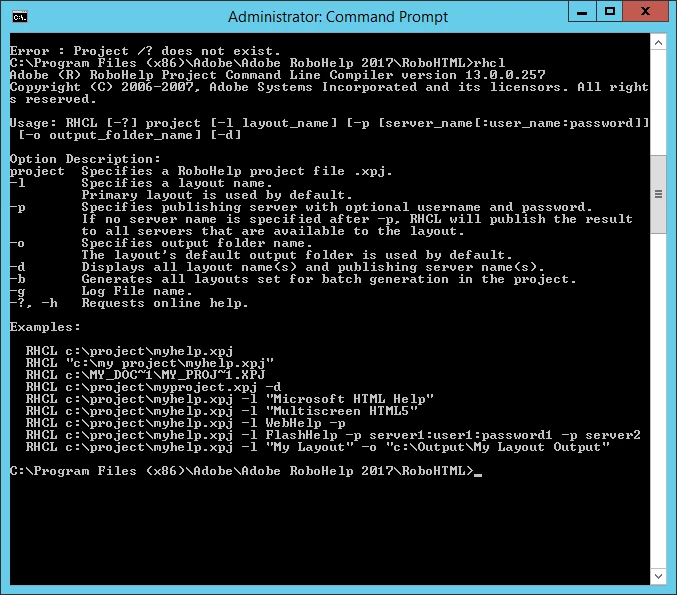
The screenshot below are the only parameters used for rhcl.
Actual Results: When performing the command line, we're using the same xpj file and layout file, but it does not add the image folder to the output like the IDE does.
Rh project structure:
- Project Files
- src
- common
- branding
- common_topics
- image
- templates
- common
- src
Question to Rh land: Is there an additional parameter to use above in conjunction for making sure to pull in everything ?
Thank you,
~PM
 AdChoices