
Inspiring
December 12, 2017
Answered

RH 2017 Search Results Grayed Out

  • December 12, 2017
  • 2 replies
  • 1202 views

Hello community members, I need your expertise. I'm getting reports from some of my developers that the Responsive HTML5 layout (Indigo) is not displaying the search results with readable text. I do not see these results on any of my test environments.
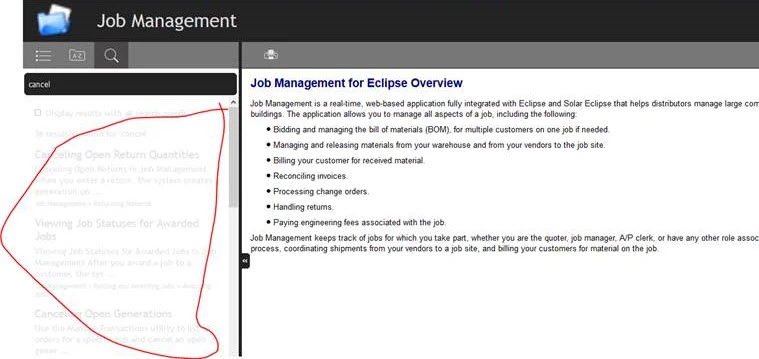
I'm wondering if anyone else is having issues like this. Could it be a plug in or something that these users might have that's causing this kind of issue? It's only a handful of users and I cannot replicate the issue myself.

My results are like this:
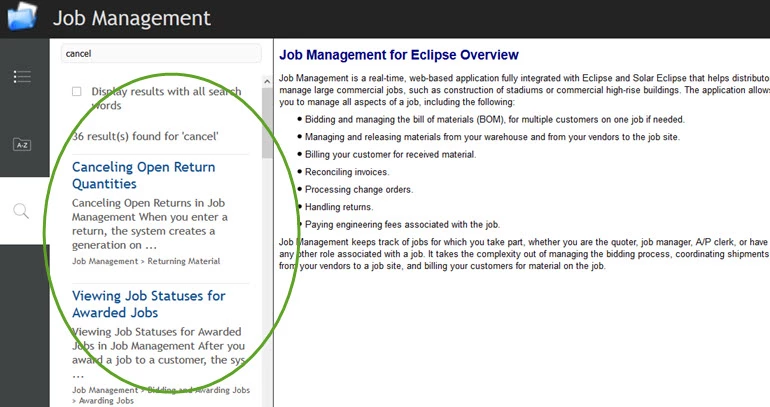
Thoughts anyone? I'm at a loss.

Thanks in advance.

This topic has been closed for replies.
Correct answer KDawnMiller

I appreciate the insight from all of you. I'll keep testing.


This issue never occurred again and cannot be recreated - and I have since changed to a different layout for this help system.. I believe it was a setting on the developer's machine. I'm calling this one resolved.

2 replies

Inspiring
December 13, 2017

Hi,

This is the Charcoal grey layout not Indigo?

First screenshot is for Search - Desktop mode - the second is Search Tablet/Mobile mode as the window size has been reduced.

In the Charcoal Grey layout there are option to set the colours for both desktop and Mobile devices. See the Search (All) and Search (Desktop) options. In search (desktop) - the title colour and preview colour must be set to light grey - change this to blue.

Peter Grainge
Community Expert
Community Expert
December 13, 2017

I think what Jeff was getting at is that one of your screenshots shows the help being used in Desktop mode and the other shows it being used in tablet mode. Note the different layout. The layout changes according to screen size and I suspect Jeff was thinking that the text also changed colour according to mode.

When you say some users are seeing the text in this pale colour, is that all tablet users or just some tablet users? Is anyone using the desktop mode also seeing the problem?

BTW. You are using RoboHelp 2017 which is logically RoboHelp 13. Please refer to it as 2017 to assist others searching the forum.


See www.grainge.org for RoboHelp and Authoring information

@petergrainge

Use the menu (bottom right) to mark the Best Answer or Highlight particularly useful replies. Found the answer elsewhere? Share it here.
Inspiring
December 13, 2017

These users are not actually using "real" tablets, but just have their  browser screen resized. I'm not sure if that matters; I wouldn't think so. Good thought on the layout colors, but the layout does not have the text set to be gray. (You were right; it's charcoal gray not indigo.)

I'm at a lost as to why their displays would show it gray, but mine doesn't when I resize it to the tablet format? I've had several other users test and they do not have grayed out text either.  I thought it might be something in these particular users' environment or browser.

Jeff_Coatsworth
Community Expert
Community Expert
December 12, 2017

Same browser? Same screen resolution? Looks like your example is narrower...

Inspiring
December 12, 2017

Sorry, failed to mention that. Yes, we tested in all three major browsers (theirs and mine) with the same results: IE, FF, and Chrome.

Jeff_Coatsworth
Community Expert
Community Expert
December 12, 2017

What about resolutions? Your screen shows the navigation down the left side & theirs is across the top.