



oliviert5031601
Inspiring
August 5, 2020
Answered

RH 2019 Classic how to show glossary as tooltips in CHM files.

  • August 5, 2020
  • 6 replies
  • 375 views

I searched a little and found some references on the website of Peter. But it is valid for RH2019 (modern).

I don't see how to define how the glossary is shown in the 'microsoft html help output properties'. (weird sentence :-)). I would like to obtain the effect of hoovering above a word giving an instant translation (from the glossary). In the modern interface, you can choose for expanding text/pop up/tooltip.


Once my project is finished (a few weeks left) I'll probably migrate the most recent version of RH, I suppose it is no problem there. But now I'm using RH2019 Classic.

Best regards

Olivier
This topic has been closed for replies.
Correct answer Peter Grainge

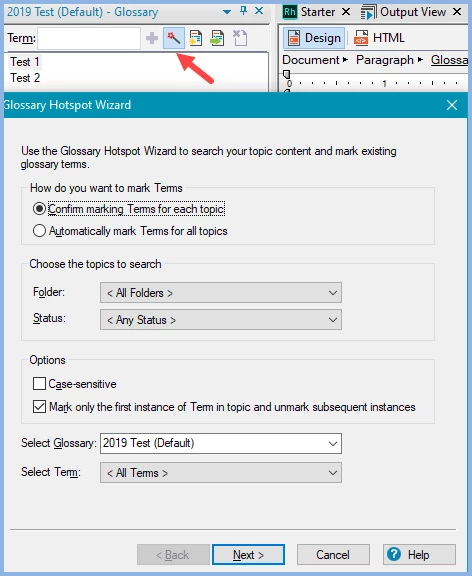
Your options are in the Glossary Hotspot Wizard. Not sure if they work for CHMs. If not, try creating webhelp and then using the script Convert WebHelp to CHM. That sometimes adds functionality not built into CHMs.


6 replies

oliviert5031601
Inspiring
August 5, 2020

We'll see! thanks alot

Peter Grainge
Community Expert
Community Expert
August 5, 2020

I don't know that tooltips will work in a CHM.


Use the menu (bottom right) to mark the Best Answer or Highlight particularly useful replies. Found the answer elsewhere? Share it here.
oliviert5031601
Inspiring
August 5, 2020

Ok. I'll leave it at that. Upgrade to 2020 is the way to go. thx

Peter Grainge
Community Expert
Community Expert
August 5, 2020

I think the tooltip is a New UI option.


You could try this https://www.w3schools.com/howto/howto_css_tooltip.asp but I'm not sure it will work in RoboHelp.


Use the menu (bottom right) to mark the Best Answer or Highlight particularly useful replies. Found the answer elsewhere? Share it here.
oliviert5031601
Inspiring
August 5, 2020

Hello Peter I didn't try the wizard as it was not corresponding to my expectations. But now I did. Indeed the definition appears when clicking on it, besides the original word:

I could not find the way to transform it in a tooltip...

Peter Grainge
Community Expert
Peter GraingeCommunity ExpertCorrect answer
Community Expert
August 5, 2020

Your options are in the Glossary Hotspot Wizard. Not sure if they work for CHMs. If not, try creating webhelp and then using the script Convert WebHelp to CHM. That sometimes adds functionality not built into CHMs.


Use the menu (bottom right) to mark the Best Answer or Highlight particularly useful replies. Found the answer elsewhere? Share it here.