
RH 2019 Classic - printed documentation does not include table borders
Hi,
another question for printed documentation which drives me crazy.
In my RH 2017 Classic project, I have multiple tables and table styles:
* By default and in the table style "celum", the table should have all borders.
* In the table style "no-border", the table should have no borders.
I am using a dedicated css file for the print output (so no Word style mapping) and everything else works fine, but no matter which table style is applied to a table in my project, the borders are never present in the Word output, even though I am explicitly (and with !important) specifying the borders for all relevant table styles as well as the default table in the print.css:
table {
	table-layout: auto	 ! important ;
	width: 100%;
	font-family: "Open Sans", sans-serif ! important;
	border: 1px solid #585858;
}
table td {
	vertical-align: top	 ! important ;
	word-break: break-word !important;
	padding: 5px	 ! important ;
	border: 1px solid #585858;
}
table th {
	vertical-align: middle	 ! important ;
	word-break: break-word !important;
	padding: 5px !important;
	border: 1px solid #585858;
}
table.celum {
	border: 1px solid #585858	 ! important ;
	border-collapse: collapse !important;
}
table.celum th {
	border: 1px solid #585858	 ! important ;
	background-color: #0079db;
}
An example:
Here is a table in the RH project:
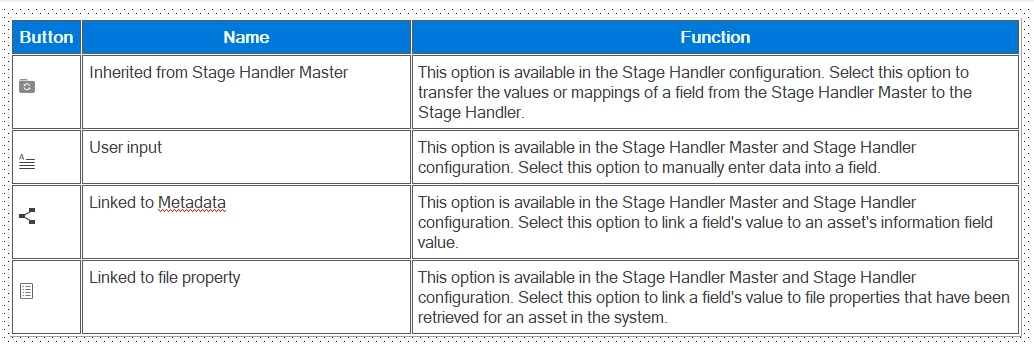
The table has the table style "celum" applied:
<table class="celum" style="border-collapse: separate;"
		 border="1">
	<col style="width: 6.037%;" />
	<col style="width: 32.991%;" />
	<col style="width: 60.972%;" />
	<tr class="hrow">
		<td><p>Button</p></td>
		<td><p>Name</p></td>
		<td><p>Function</p></td>
	</tr>
...
</table>
But in the Word output, the table looks as follows:
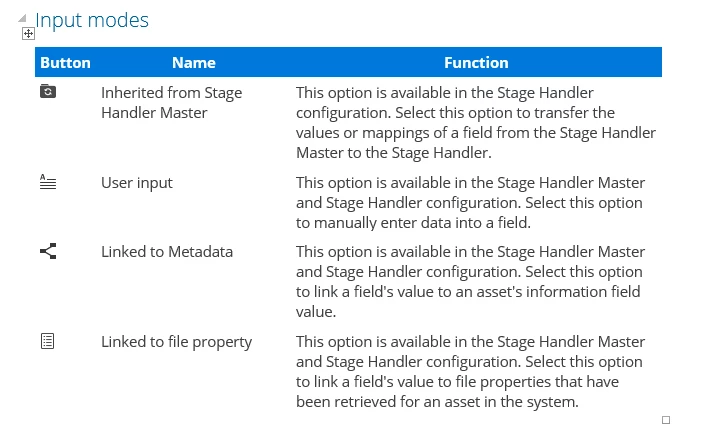
What am I doing wrong, why is the border not applied to any of my tables in the printed documentation output?
Any help is much appreciated.
Cheers,
faeneth


 AdChoices