


Known Participant
June 12, 2020
Answered

RH 2019: Empty paragraph when going from second to first level in a multilevel list

  • June 12, 2020
  • 11 replies
  • 568 views

I have tried to search the forum, and I find posts about multilevel lists, but I could not see anything matching my problem.


I am using a multilevel list in RH 2019 (new design), and when I go from the second to the first level there is an empty line (parapgraph) added between the levels (see screenshot).
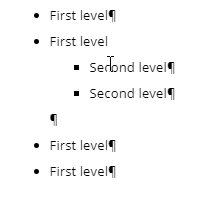
I am not able to remove it by deleting it in a normal way.

Anyone else experienced this or any ideas how to solve it?
This topic has been closed for replies.
Correct answer Amebr

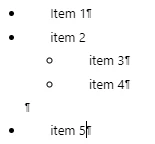
I don't think that extra paragraph mark is a problem. I think it represents the end of the nested ul or ol tag. It doesn't show when you have paragraph marks turned off, nor in the output. It's just disconcerting in RH editing mode.


Take this example.


  <ul class="Disc">
    <li>Item 1</li>
    <li>item 2
      <ul>
        <li>item 3</li>
        <li>item 4</li>
      </ul>
    </li> <!-- this is the empty paragraph mark. it correctly closes 'item 2'. -->
    <li>item 5</li>
  </ul>


11 replies

Peter Grainge
Community Expert
Community Expert
June 12, 2020

I see the same issue with that style but I don't have an answer other than it is something in the CSS. It is complex CSS and I will see if I can get an answer. It might take a couple of days.


Use menu (bottom right) to mark as Best Answer or to Highlight particularly useful replies. Found the answer elsewhere? Share it here.