

isabelleg85447096
Inspiring
October 9, 2018
Answered

RH 2019 | Formatting | Missing paragraph breaks

  • October 9, 2018
  • 2 replies
  • 1959 views

Hi Everyone,

I'm having trouble reconciling my topics from Author View and Preview View.

I want breaks between my paragraphs. In Author view I accomplished this by clicking enter twice and it looks correct, like this:
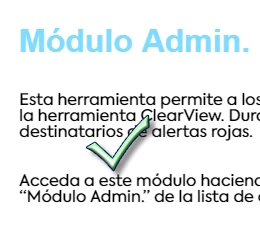
The trouble is that in Preview View, RH is removing these breaks. It looks lite this:
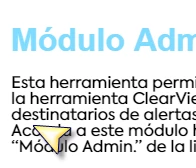
Why!?!  How can I fix this? Is there an element in the css that I haven't correctly specified?

Yes, I have saved project. Yes, I tried a reboot.

There are not yet enough resources available for me to trouble shoot this on my own and I really appreciate the community support.

Thank you!

    This topic has been closed for replies.
    Correct answer isabelleg85447096

    This issue has been corrected with Update 2.  None of the above worked.

    2 replies

    isabelleg85447096
    isabelleg85447096AuthorCorrect answer
    Inspiring
    November 19, 2018

    This issue has been corrected with Update 2.  None of the above worked.

    Peter Grainge
    Community Expert
    Community Expert
    October 9, 2018

    There was an issue with blank lines not showing in Preview but paragraphs have been OK in the beta testing and still are.

    Is the code correct? Is the correct style applied?


    See www.grainge.org for free RoboHelp and Authoring information.

    @petergrainge

    Use the menu (bottom right) to mark the Best Answer or Highlight particularly useful replies. Found the answer elsewhere? Share it here.
    isabelleg85447096
    Inspiring
    October 9, 2018

    Hi Peter,

    I'm a content author and out of my league when it comes to code.  Here is what the code looks like:

    The line break should be where the arrow is indicating.

    I tried putting code in at line 17: </p>

    but RH rejected that as a pitiful coding attempt.

    I did have trouble setting up the css styles. Noticed in the webinar that there was some coding education required to create new styles. I wonder if there is one in the css file that I haven't configured properly. Been combing through the available Styles and I don't identify one that refers to the space between paragraphs.

    Thank  you

    Peter Grainge
    Community Expert
    Community Expert
    October 10, 2018

    Try putting in the code below.

    <p>&#160;</p>

    Check only the above gets pasted in. You may need to type that in rather than paste it.

    The code for lines 17-20 has no content so you should be able to replace those lines with the above. If was just happening here that would solve the problem but even in this little code snippet, I see other instances of it.

    I believe it is a bug in 2019. Please follow this link to report bugs and request features. The more people who do so, the higher it gets prioritised.

    https://tracker.adobe.com

    Post the link to that bug/feature in this thread and others can vote for it.


    See www.grainge.org for free RoboHelp and Authoring information.

    @petergrainge

    Use the menu (bottom right) to mark the Best Answer or Highlight particularly useful replies. Found the answer elsewhere? Share it here.