

juliec18791782
Inspiring
May 26, 2020
Question

RH 2019 (Full) Search Not Working

  • May 26, 2020
  • 8 replies
  • 817 views

Hello,

I am running RH 2019.0.12 latest and publishing to RH 10 Server with Indigo layout.

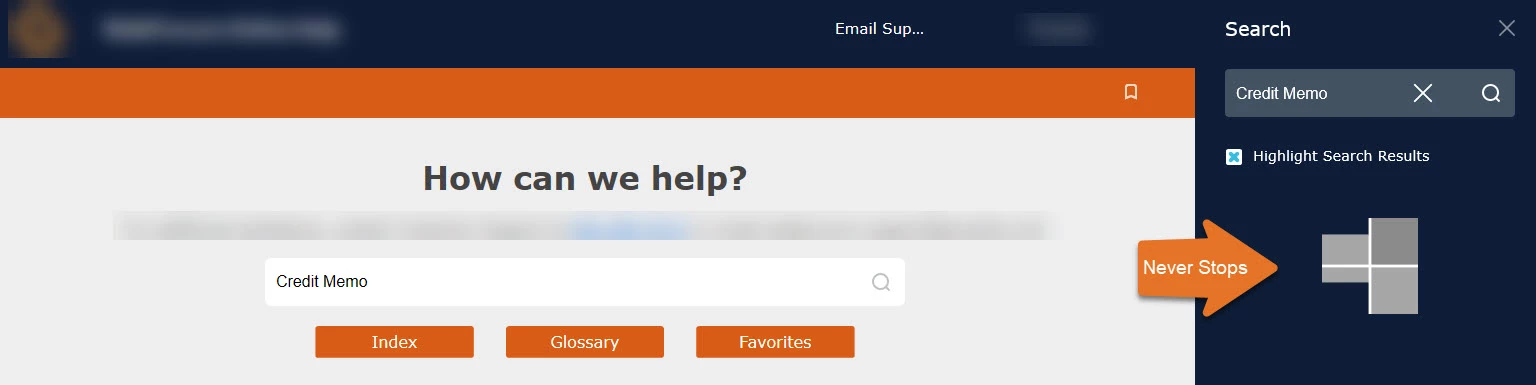
Updated content and published recently and now Search runs endlessly without finding results. 
Solutions tried so far:

  • Added a New Responsive HTML5 Layout
  • Added a New Indigo Skin
  • Restarted RH Server 10
  • Tried multiple browsers (IE, Chrome, Firefox) Fails on all
  • Cleared Cache

Other tests included:

  • Other Indigo HTML5 Projects Work

Any other suggestions?
 

This topic has been closed for replies.

8 replies

Peter Grainge
Community Expert
Community Expert
May 27, 2020

You may have had the right number of files but I suspect that one or more was not the latest version. By regenerating, you fixed that.


Use the menu (bottom right) to mark the Best Answer or Highlight particularly useful replies. Found the answer elsewhere? Share it here.
juliec18791782
Inspiring
May 27, 2020

Thanks all. An update...

  • I gained access to the server to confirm all project files existed on the server.
  • Server was restarted a second time and database connection re-established.
    • Result was an error -- shown below. According to IT it was there before the second restart and was still there after.

  • I deleted the impacted projects off of the server and republished projects using original skin and original preset.
    • Result was successful. Impacted projects now search correctly.

So, where does this leaves me...

  • Problem solved but no real understanding of which fix was the one that returned the search functionality. 
  • JSON Error found that will require research. Unsure if it is related to original issue.


As always, the level of support I receive on this forum is always beneficial and allows me to learn so much, so thank you.

juliec18791782
Inspiring
May 26, 2020

Ahh, sorry - still not sure I get it though.
I am waiting for my corporate account to be reset in order to Remote Desktop into server and view backend.

Jeff_Coatsworth
Community Expert
Community Expert
May 26, 2020

No, I meant checking using an FTP client to see all the files, folders & subfolders - the total number of files in your local generated location should equal the total number on the webserver's help folder.

juliec18791782
Inspiring
May 26, 2020

Thanks Jeff. All content is there when I navigate manually through each topic. I don't see any issues. 

Jeff_Coatsworth
Community Expert
Community Expert
May 26, 2020

Firts thing I'd check is - did all the generated files get copied up to the webserver?

juliec18791782
Inspiring
May 26, 2020

Thank you Peter. It DOES work when generated locally. Now knowing that, I was thinking I'd have our Tech Support look at the Apache database server.  What do you think?

Peter Grainge
Community Expert
Community Expert
May 26, 2020

Does the locally generated output work or is that broken as well?


Use the menu (bottom right) to mark the Best Answer or Highlight particularly useful replies. Found the answer elsewhere? Share it here.