


Inspiring
January 7, 2021
Question

(RH 2019, new UI) Search performing poorly

  • January 7, 2021
  • 12 replies
  • 228 views

Hi, Everyone.


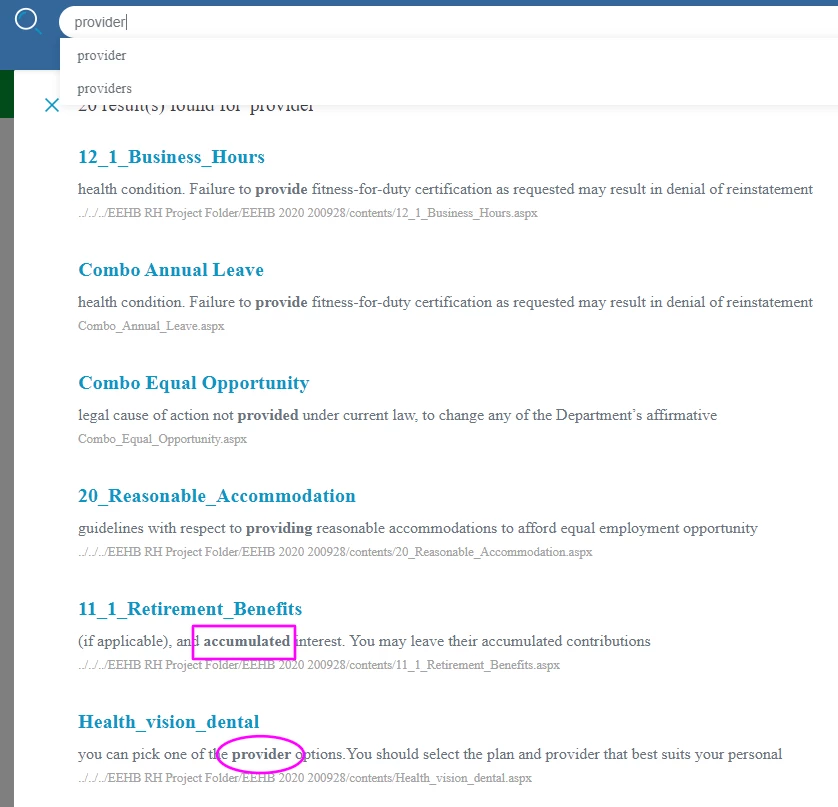
In RH 2019, new UI, frameless output, search is performing poorly. The search results return way too many similar words (including some far-flung words), and the exact match is not prioritized (screenshot, below).


I've read through this thread and some others. Please note, this issue persists whether local or on our network. Plus, I've only generated the output, not "published" it.


Thanks for any help on this! 


SCREENSHOT
 

    This topic has been closed for replies.

    12 replies

    Inspiring
    January 22, 2021

    Okay, I'll test it out in 2020.


    Thank you, Peter. Will let you know how it goes.

    Peter Grainge
    Community Expert
    Community Expert
    January 21, 2021

    As I said earlier, Adobe advises that search is improved in 2020. Whether or not that will fix it for you is another matter. 


    You could install the trial to see. Backup your projects first though in case you stick with 2019. If you don't have a subscription, you can still use the trial for 30 days.

    ________________________________________________________
    See www.grainge.org for free Authoring and RoboHelp Information

    Use the menu (bottom right) to mark the Best Answer or Highlight particularly useful replies. Found the answer elsewhere? Share it here.
    Inspiring
    January 21, 2021

    PS:  I've tested this both locally and on our network. Same results. 

    Inspiring
    January 21, 2021

    Hi, Jeff and Peter.


    It took a while, but IT finally did the uninstall / update 14, as instructed by Peter.


    But now RH search is performing even more poorly. Before, the exact match would appear six down from the top (see my screenshot, in my initial question). Now, there's no exact match in the top 20 results. (See screenshot, below.)


    What should I do next?


    Thanks!


    Inspiring
    January 7, 2021

    Excellent, Peter, will do all of that.


    Thanks!

    Peter Grainge
    Community Expert
    Community Expert
    January 7, 2021

    I think the message is something internal and you have a ticket raised for that.


    Suggest to IT that instead of upgrading they uninstall, follow the link Jeff gave you and install Update 14, it is in fact a full install. It won't affect your projects.


    Also be aware that a lot of search improvements have been made in 2020. I can't say if they will fix your issues but if you are on subscription, that could be worth pursuing.

    ________________________________________________________
    See www.grainge.org for free Authoring and RoboHelp Information

    Use the menu (bottom right) to mark the Best Answer or Highlight particularly useful replies. Found the answer elsewhere? Share it here.
    Inspiring
    January 7, 2021

    Sounds good, Jeff. I'll get on it.


    Thank you!

    Jeff_Coatsworth
    Community Expert
    Community Expert
    January 7, 2021

    That's always the first step imho! ;>)
    Sometimes it takes going to the most current version (TM) to resolve something when dealing with an older version's issue (like RH2019)

    Inspiring
    January 7, 2021

    Yes I am. I've got a ticket started for them.


    (In the past month, I've had some strange Adobe behavior on my laptop, ever since I had Adobe Captivate installed. Maybe something went awry.)


    Would you say updating RH is the necessary next step in troubleshooting for my forum question? 

    Jeff_Coatsworth
    Community Expert
    Community Expert
    January 7, 2021

    Are you running in a corporate environment? If so, harrass your IT folks.
    Have you tried going through the https://www.adobe.com/support/robohelp/downloads.html route?