Inspiring
February 4, 2021
Answered

(RH 2019, new UI) Topic title remains in main TOC though DCF filters out the content

  • February 4, 2021
  • 5 replies
  • 269 views

Hi, Everyone.


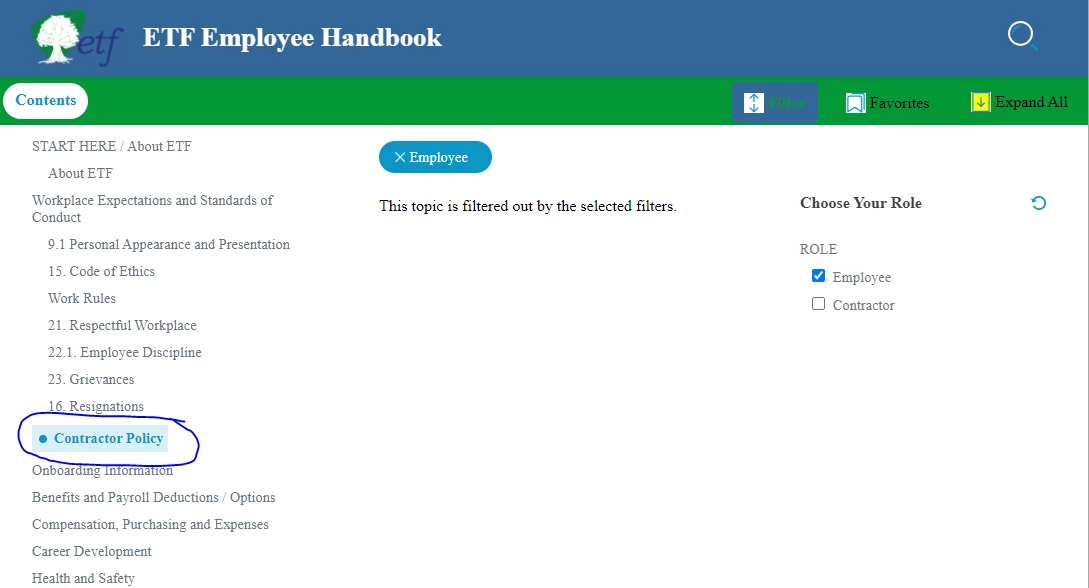
In RH 2019, new UI (frameless), when my end user chooses to filter for the "Employee" role, the DCF properly filters out the topic "Contractor Policy." However, the topic title "Contractor Policy" remains visible in the main TOC (please see screenshot, below). 


I'm not having this issue when filtering out any other topics. Only "Contractor Policy" remains visible in the main TOC.


I'd appreciate any help on this. Thanks!


SCREENSHOT:


    This topic has been closed for replies.
    Correct answer martinl83372021

    Success!!


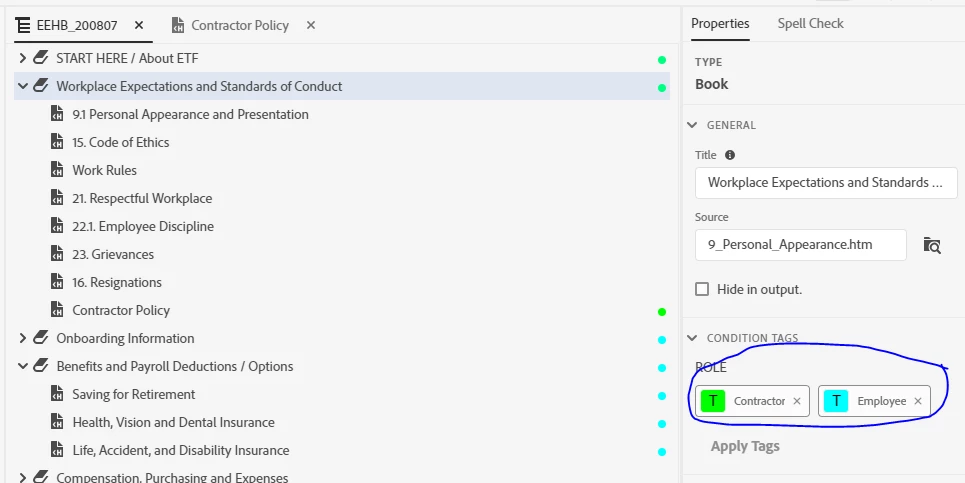
    I've figured it out. In going through the troubleshooting, I noticed something about the TOC book containing the topic at issue:  the book was tagged with both "Employee" and "Contractor." 


    I think I did that b/c the book contains some pages that belong to "Employees" and one page that belongs to "Contractors."  Now I know not to do that 🙂


    Thanks so much, Peter. As usual, you've steered me to the answer. Have a great day. 

    5 replies

    martinl83372021AuthorCorrect answer
    Inspiring
    February 5, 2021

    Success!!


    I've figured it out. In going through the troubleshooting, I noticed something about the TOC book containing the topic at issue:  the book was tagged with both "Employee" and "Contractor." 


    I think I did that b/c the book contains some pages that belong to "Employees" and one page that belongs to "Contractors."  Now I know not to do that 🙂


    Thanks so much, Peter. As usual, you've steered me to the answer. Have a great day. 

    Inspiring
    February 5, 2021

    PS:  I removed both of those tags.  And now the DCF filter behaves properly.

    Inspiring
    February 5, 2021

    Excellent, thanks for the troubleshooting steps.


    I'll try it all and report back.

    Peter Grainge
    Community Expert
    Community Expert
    February 5, 2021

    Only random things like removing the tags, checking in the code they are removed, swapping the codes to see if they then work albeit with the wrong filter. If the latter works try reapplying the correct tag.


    All updates applied?


    Clearing the browser cache and trying a different browser?


    After that I think it's Support unless anyone else has an idea.

    ________________________________________________________
    See www.grainge.org for free Authoring and RoboHelp Information


    Use the menu (bottom right) to mark the Best Answer or Highlight particularly useful replies. Found the answer elsewhere? Share it here.
    Inspiring
    February 5, 2021

    Thanks, Peter. It's already tagged:


    And the topic itself is tagged:


    Anything else I should try?

    Peter Grainge
    Community Expert
    Community Expert
    February 5, 2021

    Try tagging the TOC entry as well.

    ________________________________________________________
    See www.grainge.org for free Authoring and RoboHelp Information

    Use the menu (bottom right) to mark the Best Answer or Highlight particularly useful replies. Found the answer elsewhere? Share it here.