
RH 2019 Node.js Error Question
My name is Sean Gallagher, and I have been a (Macromedia) Adobe RoboHelp Certified Instructor since 2006. Typically, teaching RoboHelp has been one of many Adobe courses that I’ve taught, and the product had been built on the same code base up until version 2019 (non-classic). Now I’m seeing more demand for RoboHelp, but lately new issues are, well, TOTALLY new.
I’ve wrangled with Node.js before. Often a command line directive would be used for such issues for other applications of Node.js. In the past, I would have advised that students convert a PDF to an HTML topic for integration into RH. Is RH2019 somehow reading and indexing the PDFs that are added to the RH2019 project? This would actually be fantastic...but I need to know where to go to try to resolve such issues.
I want to tell Sue that once RoboHelp sends such JavaScript errors….you will HAVE to kill the program using the Task Manager. Node.js does NOT degrade gracefully. Once it is broken….it is BRO-KEN.
The idea of Sue deleting and then re-creating her Knowledge Library topic is would my initial advice would have been. I’d also like toi know if you think it would be better for their PDFs to be hosted on a SharePoint or other intranet site and just LINKED to the RH2019 topic.
Sean Gallagher
_________________________ START OF COPIED EMAIL _____________________
Hi Sean,
Thanks for looking in to this for me!
I’d like to get a handle on this problem, but I don’t have any urgency anymore, because I took my (metaphorical) sledge hammer to the problem and now have a work around. I was successfully able to delete the entire topic, and am now re-creating it.
Of course, without having been able to identify or fix the root of the problem, who knows if/when it will come back.
But here’s all the gory details of the problem.
Yes, I’m running RoboHelp 2019 – not Classic.
My project has a topic called “Library.” It has a little bit of explanatory type, and a bunch of links to pdfs. I had not added anything to this Topic for quite a while, and suddenly, when I tried to Generate Output, (after adding some content to a completely different Topic) I got this error.
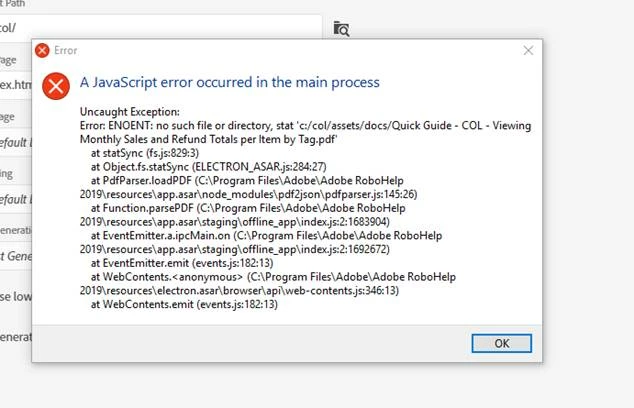
Some of the pdfs were added by Importing the file into the docs folder. Some had been just dragged onto the page from File Explorer. I don’t know which method had been used on the file that blew up.
When that error appeared, there was no way to get out of it. Hitting Ok did nothing. The X in the upper right-hand corner did nothing. In order to get out of that page, I had to go to the Task Manager and kill RoboHelp.
I tried to delete just the file in question, and was given this message:
I couldn’t find any other project files where the offending file was referenced. So that’s when I brought out the sledge hammer. I deleted the entire Topic. There was no problem in doing so. (I’d been concerned that if the file really was being used somewhere else I wouldn’t be allowed to delete the Topic, but no issue showed up). Now I’m re-creating the Topic Library.
When I started recreating the Library, I started by making sure that the specific pdf that has been listed in the Java script error message was in the docs file, then dragged it out to the page to link to it. I then generated output. Everything worked fine.
For pdfs that aren’t already in the docs file, I’ve been adding pdfs them in. Then I drag the pdfs onto the page to link to them. I Generate Output after every couple of pdfs that I add. So far it’s worked.
Here is the info on the version # I’ve got:
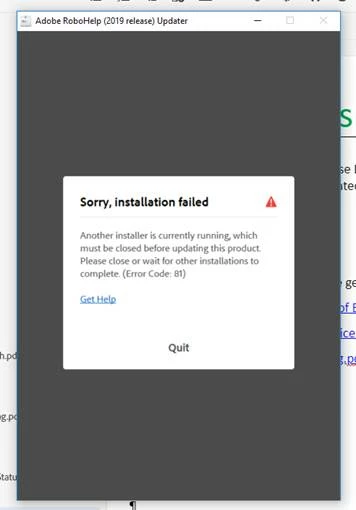
I am not able to get updates, this is what I get when I hit Update:
No other installer should be running, nothing is going on other than the project that I’m working on. So maybe not being all current on updates could be the source of all the junk that happened?
I really appreciate your taking the time to help me.
Thanks,
Sue
_________________________ END OF COPIED EMAIL _____________________
Moderator - Personal details removed.


 AdChoices