


Participating Frequently
May 14, 2024
Question

RH 2020.8.34 - Unable to connect to salesforce

  • May 14, 2024
  • 5 replies
  • 412 views

I am following the steps mentioned in article: https://helpx.adobe.com/in/robohelp/using/publish-salesforce.html
Using my RH I am able to create a profile, log in to SF, and even on the SF backend the admin could confirm that I am able to login via RH.

However, for some reason the highlighted details are not getting populated:
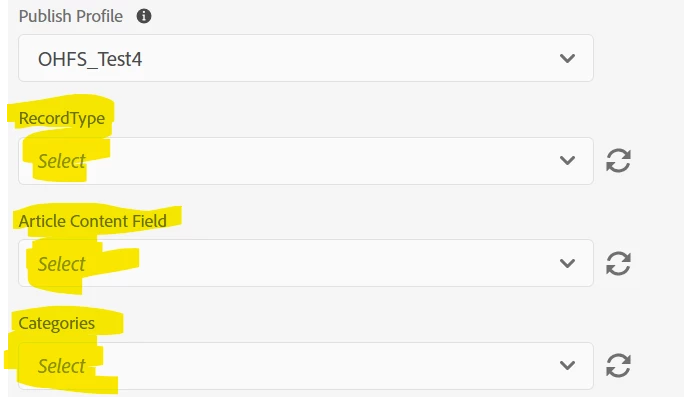
Any idea what may be failing? Is there any specific access needed? I have the knowledge manager access on SF side.

    5 replies

    Peter Grainge
    Community Expert
    Community Expert
    November 17, 2025

    @ManualMan Any updates? 2022.5 is the current version. Have you tried that?

    ________________________________________________________

    My site www.grainge.org includes many free Authoring and RoboHelp resources that may be of help.


    Use menu (bottom right) to mark as Best Answer or to Highlight particularly useful replies. Found the answer elsewhere? Share it here.
    Participating Frequently
    November 17, 2025

    Hi Peter. I have 2022.6.34. Adobe Support is looking into the issue and will get back to me. Thanks for your reply!

    Participating Frequently
    November 17, 2025

    I am having this same problem. Any updates?

    Jeff_Coatsworth
    Community Expert
    Community Expert
    November 17, 2025

    Haven't heard much lately about SF connection issues - give the RH folks a try and see what they say.

    JoeJitsu
    Known Participant
    August 30, 2024

    I am running into this same issue...did you ever resolve this?

    Participating Frequently
    September 2, 2024

    No @JoeJitsu , unfortunately still facing the same issue. RH latest update did not help. Surprisingly, the UAT instance of SF somehow works. Checked every setting with the SF admin on the Prod setup, but no luck. The support team is unable to help much. They did provide very detailed steps, which was great.


    Also, there is no way to bypass the above highlighted fields and still publish. Do share anything you are able to figure out.

    Community Expert
    May 22, 2024

    Do note that the help is wrong, although I can't provide the actual correct help. All I know is that setting up accounts has nothing to do with Salesforce Knowledge. You could confirm you have set up record types, etc in Knowledge and you have applied the proper permissions to view and edit them. And make sure Knowledge is turned on for the org (I assume this is done but doesn't hurt to double-check.)


    Here is the bug I logged and the status appears to be in test, so hopefully further details will be provided soon.

    https://tracker.adobe.com/#/view/RH-8580


    Participating Frequently
    May 22, 2024

    Thanks @Amebr for the ticket. I voted for it.

    Jeff_Coatsworth
    Community Expert
    Community Expert
    May 14, 2024

    Not many SF people on the forum - you probably need to talk to the RH folks - see https://helpx.adobe.com/contact/enterprise-support.other.html#robohelp for your Adobe Support options. I'd recommend using the tcssup@adobe.com e-mail address as it reaches a team dedicated to Technical Communication Suite products including RoboHelp.