Inspiring
April 22, 2021
Question

RH 2020 - Breadcrumbs not working in both Indigo and Studio Skins

  • April 22, 2021
  • 22 replies
  • 544 views

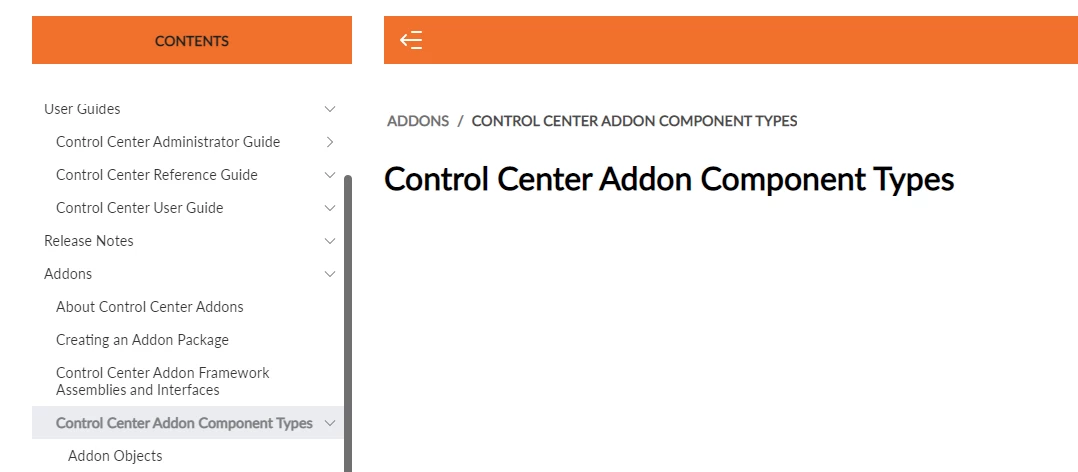
I cant seem to get breadcrumbs working in my output anymore. In the indigo skin, the breadcrumbs are there but if  you click on them, they do nothing and in the Studio skin, the dont display at all beyond heading 2. So if you have a heading 3 in your TOC, there are no breadcrumbs at all. Is there something else I have to do?



    This topic has been closed for replies.

    22 replies

    Inspiring
    April 23, 2021

    I think I have spotted a trend. (Btw this is also happening in a project where there are no child projects). Where I have a section heading that is linking to a topic, the breadcrumb does not work. Where I have a section that is just a title, the breadcrumb works. However, I don't want section that does not link to a topic as then you get an extra layer of TOC tiles and I want the help to go from the heading of the guide, straight into the topic view. 


    Inspiring
    April 23, 2021

    Yes I will try that. Actually I have noticed that some are working and some are not. I cant work out what is going wrong here.

    Peter Grainge
    Community Expert
    Community Expert
    April 23, 2021

    I realise you don't want them twice, it was about whether those breadcrumbs work. They can be removed now.


    Focussing on the indigo skin, generate one or two of the child projects to a folder outside the merge so that they work as standalone projects. Do the breadcrumbs then work?

    ________________________________________________________
    See www.grainge.org for free Authoring and RoboHelp Information

    Use the menu (bottom right) to mark the Best Answer or Highlight particularly useful replies. Found the answer elsewhere? Share it here.
    Inspiring
    April 23, 2021

    So I added breadcrumbs in the master page and now I have them twice. Althought the breadcrumbs I added in the master page are working but they don't look as nice and I dont want them twice.


    Peter Grainge
    Community Expert
    Community Expert
    April 23, 2021

    That is the right structure for your outputs.


    Indigo is a responsive skin. Don't you have to use a master page for the breadcrumbs? Normally I would look but I have to go out for a while.


    Frameless skins like Studio have a skin option but you should be able to deselect it and use a master page.


    Studio in new so try the more tested Orange. Just add it to the parent.

    ________________________________________________________
    See www.grainge.org for free Authoring and RoboHelp Information

    Use the menu (bottom right) to mark the Best Answer or Highlight particularly useful replies. Found the answer elsewhere? Share it here.
    Inspiring
    April 23, 2021

    I think I see what you mean. I have this:


    Parent

    • Child
    • Child
    • Child

    I dont have this:

    Parent

    • Child
    •  Child
      • Child
      • Child
    • Child

    Is that what you mean? 

    Yes I have tried regenerating everything from the beginning, so parent and then generating the output into each of the merged folders. 

    And yes I have checked all the output for each of the children is using the right skin.

    How do you enable breadcrumbs in the skins? Seems like they should be there for Indigo? 


    Peter Grainge
    Community Expert
    Community Expert
    April 23, 2021

    So there is no nesting, it's just a case of the first section, the second section and so on. No sections within sections (books within books), correct?


    • Indigo has breadcrumbs for all topics but they don't work.
    • Studio has breadcrumbs for topics in User Guides and Release notes but not for Add Ons and anything below. You haven't said whether the ones you see work.


    All the child projects should inherit the skin from the parent so as long as breadcrumbs are enabled in the skin for the parent, they should work.


    Have you generate all the projects afresh starting with the parent?


    Check all the skins even though only the parent should matter.


    Let us know how that goes.

    ________________________________________________________
    See www.grainge.org for free Authoring and RoboHelp Information


    Use the menu (bottom right) to mark the Best Answer or Highlight particularly useful replies. Found the answer elsewhere? Share it here.
    Inspiring
    April 23, 2021

    I am using RH 2020 Update 4 but actually this particular project broke in Update 3. I did have it working correctly at some point! Here is the parent toc.

    Peter Grainge
    Community Expert
    Community Expert
    April 23, 2021

    The Book TOC shouldn't be a problem as they are interchangeable, it's just a way of making it clear that Book TOCs have front and back matter but that just gets ignored in an online output.


    You hadn't said this a merged output. Has this gone wrong since upgrading to 2020 and if so, what did you upgrade from?


    How are things set up in the parent TOC? Please add a screenshot of the view of the parent TOC in your project, not the output. Please use the photo icon to insert images within the post. Seeing an image inline with the text makes it easier for anyone answering or viewing the post.

    ________________________________________________________
    See www.grainge.org for free Authoring and RoboHelp Information


    Use the menu (bottom right) to mark the Best Answer or Highlight particularly useful replies. Found the answer elsewhere? Share it here.
    Inspiring
    April 23, 2021

    Oh! Just realized that the TOC in one of the child projects is a book TOC. Could that be the problem?