


Inspiring
November 19, 2021
Question

RH 2020 - condition expressions

  • November 19, 2021
  • 8 replies
  • 398 views

We are using condition expressions and having problems. I found this in the user guide.
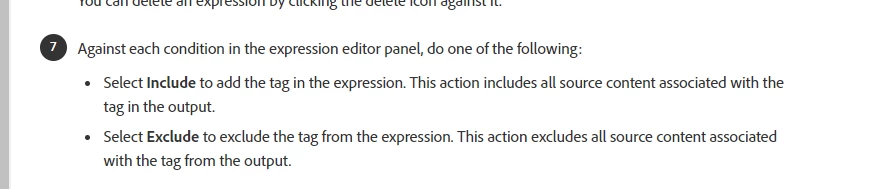
Does this mean, that you cannot have both an include an exclude in the same condition expression? A condition expression must have all includes or all excludes?


Thank you

    This topic has been closed for replies.

    8 replies

    Community Expert
    November 23, 2021

    If you are launching a notification, do start > test settings 

    • Start is tagged as both org admin and account admin
    • Test is tagged as org admin and Settings is tagged as account admin


    If I have condition tag that is for group manager (another role completely) which is just Include when Audience is group manager, then this is what is displayed: 


    If you are launching a notification, do > 


    This output is correct. When you generate for Group Manager only, any text that is NOT tagged will be included AND any text that is tagged for 'Group Manager' will be included.


    When you tagged "Start" with 'Org Admin' and 'Account Admin' you said "this text is only relevant for 'Org Admin' and 'Account Admin' users". Therefore it is removed when you generate output for 'Group Manager' users as it is not relevant for them.

    Inspiring
    November 23, 2021

    You are right and it is mind bending! I am even struggling work out what it is we are trying to do! But essentially, we are trying to tag text for different roles. What you are suggesting works if you have multiple tags applied to paragraph tag for example. But when I have word that changes, depending on a role, this doesnt work. For example:


    If you are launching a notification, do start > test settings 

    • Start is tagged as both org admin and account admin
    • Test is tagged as org admin and Settings is tagged as account admin


    If I have condition tag that is for group manager (another role completely) which is just Include when Audience is group manager, then this is what is displayed: 

    If you are launching a notification, do > 

    That's not right is it? Because the text is tagged for other tags so why does it not display for Group Manager? Are we saying that we have to tag all text with some kind of tag? 

    Are we trying to do something that Robohelp is not designed to do?

    Jeff_Coatsworth
    Community Expert
    Community Expert
    November 23, 2021

    I've found it usually is clearer if you just repeat the whole sentence & tag it with the appropriate tag - then you never get partial bits hanging around.

    Community Expert
    November 23, 2021

    "Include" would typically be used if you apply multiple conditions to the same piece of text. However, you then need to use OR, and also get your ANDs and ORs in the right order. And it gets mind-bending very quickly. And frankly my brain isn't big enough to figure it out or keep it straight once I do.


    However, if you want to generate a standalone output that includes all unconditioned text and all text that is conditioned for Account_Administrator (regardless of any other tags that may be applied to that text), then setting the expression as "Include Account_Administrator" (no excludes at all), should produce what you want.


    Peter Grainge
    Community Expert
    Community Expert
    November 22, 2021

    Your question was can you have both and the answer to that is you can. My response was a general response advising that in most scenarios exclude alone works best for the reasons I gave. That is why I prefaced my answer "at its simplest".


    There probably are scenarios where they are needed but I personally never found one. No doubt there is someone who can chip in.

    ________________________________________________________
    See www.grainge.org for free Authoring and RoboHelp Information


    Use the menu (bottom right) to mark the Best Answer or Highlight particularly useful replies. Found the answer elsewhere? Share it here.
    Inspiring
    November 22, 2021

    So, in answer to my question, you cannot have a condition expression that contains both excludes and includes. I have tried it and you cannot. I notice that in your example project, Peter, all your condition expressions are excludes, which as you say, is what works.

    I think that the software should not allow you to select this combination if it does not work. 

    We are going to have to rewrite content to accommodate this now. 

    Jeff_Coatsworth
    Community Expert
    Community Expert
    November 19, 2021
    Peter Grainge
    Community Expert
    Community Expert
    November 19, 2021

    At its simplest in 2020 anything in the TOC used is included so you only need to exclude what you don't want. Also historically in RoboHelp exclude expressions have always worked better.


    See if this helps. Build Expressions (grainge.org)

    ________________________________________________________
    See www.grainge.org for free Authoring and RoboHelp Information

    Use the menu (bottom right) to mark the Best Answer or Highlight particularly useful replies. Found the answer elsewhere? Share it here.
    Inspiring
    November 19, 2021

    We have this and it is not working. If you text with multiple condition tags applied, all the text is excluded. 

    We have content that applies to more than one role (sometimes 4 or 5 roles - and that content has 4 or 5 condition tags applied to it) and steps that are different depending on your role. So how do we need to set up our condition expressions?