


Inspiring
February 18, 2021
Question

RH 2020 - in Word output, the second line of my lists indent. They dont line up with the first line.

  • February 18, 2021
  • 4 replies
  • 136 views

In my Word output, for lists I get this:

I can see in my Word document that I have a hanging indent and a left tab. The left tab is the wrong place. The hanging indent is in the right place.
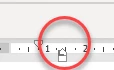
 If I type directly in the Word document, and apply a list style, the lists style is applied correctly.  The lists are correct in the HTML and PDF outputs.

    This topic has been closed for replies.

    4 replies

    Inspiring
    February 18, 2021

    Great, thank you very much Peter.

    Inspiring
    February 18, 2021

    I am on the latest version 2020.3.32. Yes, this happens if I am creating a list from the toolbar in RH. 

    Peter Grainge
    Community Expert
    Community Expert
    February 18, 2021

    Yes it is a known issue that should be fixed in the next update.

    ________________________________________________________
    See www.grainge.org for free Authoring and RoboHelp Information

    Use the menu (bottom right) to mark the Best Answer or Highlight particularly useful replies. Found the answer elsewhere? Share it here.
    Peter Grainge
    Community Expert
    Community Expert
    February 18, 2021

    I thought this was a known issue but I can't find any reference to it. I will check further.


    Do you have all updates applied? Help should show 2020.3


    If you use a list style from the toolbar, do you still see this?

    ________________________________________________________
    See www.grainge.org for free Authoring and RoboHelp Information

    Use the menu (bottom right) to mark the Best Answer or Highlight particularly useful replies. Found the answer elsewhere? Share it here.