


Participating Frequently
August 23, 2021
Answered

RH 2020 - Linking Word Documents, can I Create/Update multiple Topics at once?

  • August 23, 2021
  • 3 replies
  • 200 views

I have linked a folder on my computer with multiple Word documents to my RoboHelp project. 

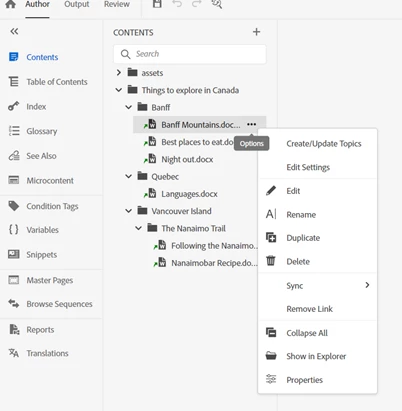
After they uploaded in RoboHelp, to create the corresponding Topics, I have to click 'Create/Update Topics'. Is there a way to Create/Update all Topics at once? Or do I have go to each separate link to create the Topic? Thanks
 

    This topic has been closed for replies.
    Correct answer Amebr

    I think you can right-click on the top folder and select Word Documents > Update All.

    3 replies

    Peter Grainge
    Community Expert
    Community Expert
    August 24, 2021

    @Amebr Good catch.


    I just linked a folder with many Word documents in it. Using the Update All it created folders within the linked folder that contained the topics created and their assets. The downside is it creates them for all the Word documents in the linked folder and you may not want all of them.

    ________________________________________________________
    See www.grainge.org for free Authoring and RoboHelp Information

    Use the menu (bottom right) to mark the Best Answer or Highlight particularly useful replies. Found the answer elsewhere? Share it here.
    AmebrCommunity ExpertCorrect answer
    Community Expert
    August 24, 2021

    I think you can right-click on the top folder and select Word Documents > Update All.

    Peter Grainge
    Community Expert
    Community Expert
    August 23, 2021

    The latter, one by one.


    Please follow this link to report bugs or request new features. https://tracker.adobe.com. Post the link to your bug report / feature request in this thread and others can vote for it. The more people who do so, the higher it gets prioritised.

    ________________________________________________________
    See www.grainge.org for free Authoring and RoboHelp Information

    Use the menu (bottom right) to mark the Best Answer or Highlight particularly useful replies. Found the answer elsewhere? Share it here.