


Inspiring
March 15, 2021
Answered

(RH 2020) Review window cuts off right half of content

  • March 15, 2021
  • 12 replies
  • 435 views

Hi, Everyone.


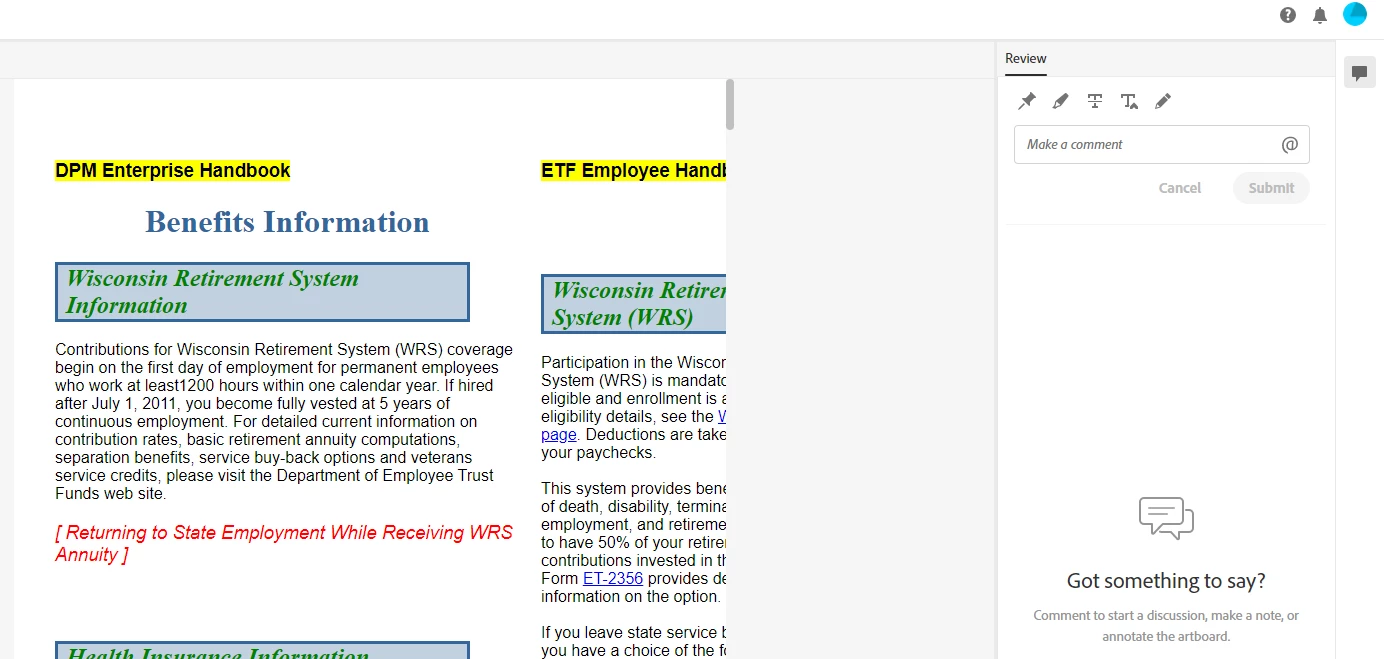
In RH 2020, the online review window is cutting off the right side of the page, without any way to scroll to it (screenshot, below).


Any advice for me? Thank you!


SCREENSHOT
    This topic has been closed for replies.
    Correct answer martinl83372021

    Thanks, Peter, I've submitted my bug report to the Tracker.


    Here's the link to it:  https://tracker.adobe.com/#/view/RH-8928 


    PS:  I no longer think it's the table-within-a-table that's causing this issue. I've removed it, but the issue persists. 

    12 replies

    Peter Grainge
    Community Expert
    Community Expert
    March 16, 2021

    When you set up a review to the left of what is in the screenshot in the Active Reviews panel you should see a list of topics. As you double click each one, they should open in the areas shown in separate tabs. You seem to have got two topics open in one tab. I can't tell from your limited screenshot.


    I have tried using the Split option by right clicking tabs but it still doesn't look like your screenshot.


    Have you tried closing the review and reopening it?

    ________________________________________________________
    See www.grainge.org for free Authoring and RoboHelp Information

    Use menu (bottom right) to mark as Best Answer or to Highlight particularly useful replies. Found the answer elsewhere? Share it here.
    Community Expert
    March 15, 2021

    Dumb question, but I haven't ever tried the online review feature. If you use the vertical scroll bar I can see, and go right to the bottom of the page, is there a horizontal scroll bar there?