


Inspiring
December 8, 2021
Answered

Rh 2020 - Studio skin - removing icons in left toolbar

  • December 8, 2021
  • 4 replies
  • 289 views

Hi 

Does anyone know how you customize this toolbar in the studio skin:



I only want favorites and share. For share, I only want to be able to share in an email, not to linked in, twitter or facebook.  

Also for Filter, does this only work if you have dynamic filters configured? So if we dont have any dynamic filters, I should hide this too?

If I cannot hide individual buttons, can I remove the toolbar completely? If so, how do I do this?

    This topic has been closed for replies.
    Correct answer Peter Grainge

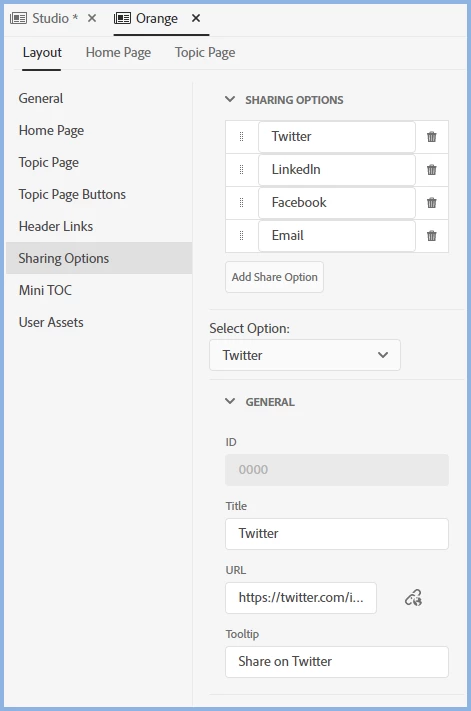
    In an Orange Skin I see these options.


    In a default Studio skin I don't see any of those set up so I am not sure how you have them.


    In theory it should be as simple as deleting whichever options you don't want.

    ________________________________________________________
    See www.grainge.org for free Authoring and RoboHelp Information

    4 replies

    Inspiring
    December 10, 2021

    Thank you Peter! I found these options in the Layout tab in the Studio skin. 


    Peter Grainge
    Community Expert
    Peter GraingeCommunity ExpertCorrect answer
    Community Expert
    December 9, 2021

    In an Orange Skin I see these options.


    In a default Studio skin I don't see any of those set up so I am not sure how you have them.


    In theory it should be as simple as deleting whichever options you don't want.

    ________________________________________________________
    See www.grainge.org for free Authoring and RoboHelp Information

    Use the menu (bottom right) to mark the Best Answer or Highlight particularly useful replies. Found the answer elsewhere? Share it here.
    Inspiring
    December 9, 2021

    Thats a good idea but I cant work out how to configure the URL. Do you know where this is configured?


    Inspiring
    December 9, 2021

    Actually I have hidden the icons I dont want. However, for share, it is possible to launch the link to twitter etc even though you are effectively clicking on white space. Is there anyway I can turn off those links? 

    Jeff_Coatsworth
    Community Expert
    Community Expert
    December 9, 2021

    If you can't turn off the URL to those buttons, you could hijack them to point to something you do want - like your company's homepage or a mailto: link.