


Inspiring
June 7, 2021
Question

RH 2020 Update 4 - Selected title in Studio output

  • June 7, 2021
  • 6 replies
  • 172 views

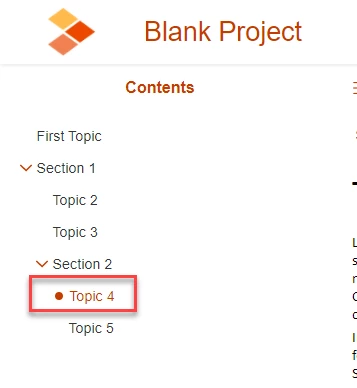
I want to remove the dot from the currently selected topic in my studio skin. However, I cant work out where this is configured.  I am in Topic page > Left panel. I think this should be the selected-title option, but I cant see where you configure the dot? 


    This topic has been closed for replies.

    6 replies

    Peter Grainge
    Community Expert
    Community Expert
    June 7, 2021

    ... or try 

    Topic Page > Left Panel > selected-icon>LAYOUT>Display : none

    ________________________________________________________
    See www.grainge.org for free Authoring and RoboHelp Information

    Use the menu (bottom right) to mark the Best Answer or Highlight particularly useful replies. Found the answer elsewhere? Share it here.
    Peter Grainge
    Community Expert
    Community Expert
    June 7, 2021

    No need for another project. Just add a second copy of Studio with a different name, Studio2.

    ________________________________________________________
    See www.grainge.org for free Authoring and RoboHelp Information

    Use the menu (bottom right) to mark the Best Answer or Highlight particularly useful replies. Found the answer elsewhere? Share it here.
    Inspiring
    June 7, 2021

    Yes I am seeing a dot in the Studio skin that I want to remove. The skin I am using is the Studio skin. It is when a section is selected, I think. Although, it only seems to be the top level section, and it doesnt display when a topic is selected. I find it hard to work out which option you need. For example, is it expanded title, collapsed title, title-level-O? The other thing is, when I am editing the skin, the dot does not display but it is there in the output. 


    When I first started configuring the skin the dot did not appear in the output. It has started appearing. I think I have configured something by mistake but I cant work out how to get rid of it. 


    Just wondering if I need to start again with a new project, configure the studio skin, export it and import it into my existing project.

    Peter Grainge
    Community Expert
    Community Expert
    June 7, 2021

    So I have just generated my test project with the studio skin and there is no dot. However, in I am using the studio skin in my RH project and I am getting a dot


    So are you seeing a dot in Studio or not? If you mean you have a project using the Orange skin, I am trying to find out if that can be removed/hidden.

    ________________________________________________________
    See www.grainge.org for free Authoring and RoboHelp Information


    Use the menu (bottom right) to mark the Best Answer or Highlight particularly useful replies. Found the answer elsewhere? Share it here.
    Inspiring
    June 7, 2021

    Yes you are right. So I have just generated my test project with the studio skin and there is no dot. However, in I am using the studio skin in my RH project and  I am getting a dot. Do you know how I can remove this? 


    Peter Grainge
    Community Expert
    Community Expert
    June 7, 2021

    You have stated Studio skin and shown the Orange skin.

    ________________________________________________________
    See www.grainge.org for free Authoring and RoboHelp Information

    Use the menu (bottom right) to mark the Best Answer or Highlight particularly useful replies. Found the answer elsewhere? Share it here.