Christine Krueger
Known Participant
September 16, 2021
Question

RH 2020 - Windows cannot find first topic

  • September 16, 2021
  • 7 replies
  • 215 views

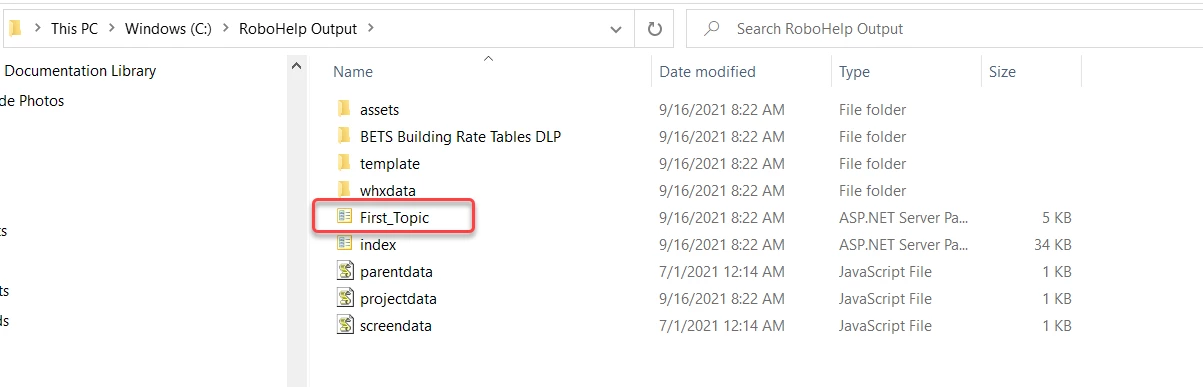
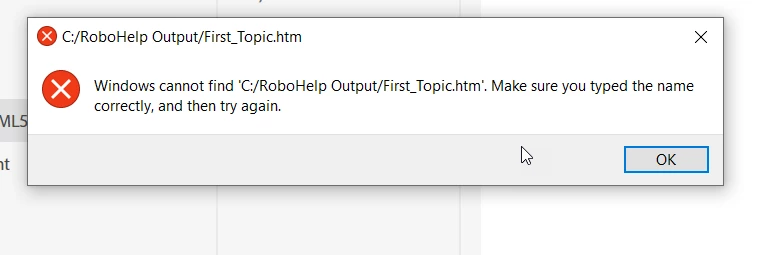
New to using RH2020. Struggling to generate output. I get a message that says, "Windows cannot find 'C:/RoboHelp Output/First_Topic.htm' " Not sure what to do next - attaching a couple of screen shots. 
This topic has been closed for replies.

7 replies

Peter Grainge
Community Expert
Community Expert
September 17, 2021

That's what I was driving at, your source was HTM but you were not generating that. I recommend you set File Explorer to show file extensions to make such differences more obvious.

________________________________________________________
See www.grainge.org for free Authoring and RoboHelp Information

Use the menu (bottom right) to mark the Best Answer or Highlight particularly useful replies. Found the answer elsewhere? Share it here.
Christine Krueger
Known Participant
September 17, 2021

Our team worked through the output this morning. Discovered that if I unchecked the "Publish to SharePoint" box, it processed correctly.  Thanks for all your input. 

Peter Grainge
Community Expert
Community Expert
September 17, 2021

OK it is a .HTM file in the source but your earlier image showed this in the output. 


You have File Explorer set up not to show extensions so we cannot see what it is but Explorer seems to think it is something other than HTM based on the Type shown.


Where is the outputs folder, local or on a server?

________________________________________________________
See www.grainge.org for free Authoring and RoboHelp Information

Use the menu (bottom right) to mark the Best Answer or Highlight particularly useful replies. Found the answer elsewhere? Share it here.
Community Expert
September 17, 2021

Can you see the First_Topic file when you view the Contents section under the Author tab in RH?

Christine Krueger
Known Participant
September 17, 2021

Yes, when I am in the Contents pane, I can see my "You Are Here" file, which is actually the First_Topic file. If I click on the three dots, select "view in Explorer", I can see it labeled as First_Topic, an HTML file. 

First_Topic.

Peter Grainge
Community Expert
Community Expert
September 16, 2021

I just noticed in the screenshots in your original post the file type is ASP.NET. The preset says to look for an HTM file but that screenshot is showing an ASP.NET file. Check the file names and types.

________________________________________________________
See www.grainge.org for free Authoring and RoboHelp Information

Use the menu (bottom right) to mark the Best Answer or Highlight particularly useful replies. Found the answer elsewhere? Share it here.
Christine Krueger
Known Participant
September 16, 2021

In the Output pane, under Responsive HTML5, Content, and Default Topic, it shows "First_Topic.htm".  When I look at the files in File Explorer, under the project folder, then the Contents folder, there is an HTML file called "First_Topic."

Adding screenshots.  

Peter Grainge
Community Expert
Community Expert
September 16, 2021

It is looking for whatever file you have defined as the default. Often what happens is you start a project and RoboHelp creates First Topic as the default. That then gets defined in the preset. Then you delete First Topic as you don't want it but don't change the preset. 


What is defined in your preset and does it exist?

________________________________________________________
See www.grainge.org for free Authoring and RoboHelp Information

Use the menu (bottom right) to mark the Best Answer or Highlight particularly useful replies. Found the answer elsewhere? Share it here.