


Inspiring
January 20, 2023
Answered

RH 2022: How to disable the Insert paragraph here(blue line) indicator/icon from the master page

  • January 20, 2023
  • 10 replies
  • 3001 views

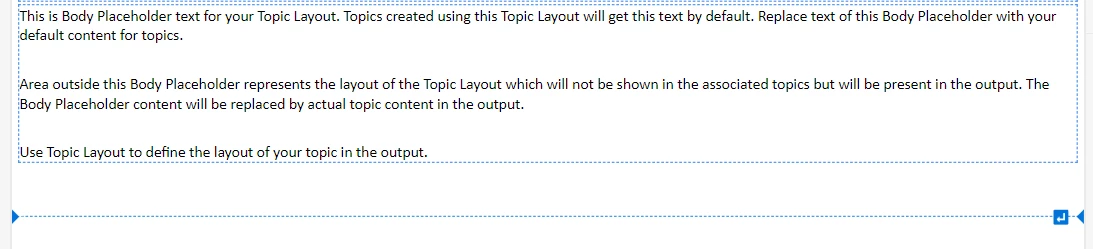
Hi, please let me know how to remove this blue line (Insert paragraph here) from the master page.

This blue line appears on all the pages because it is on the master page. Please let me know to disable this insert paragraph indicator/icon



    Correct answer Lija SN

    Oh, I just got the solution. It was because of the master page. I deleted the master page, and the line is gone from all the pages in the responsive HTML.

    10 replies

    Peter Grainge
    Community Expert
    Community Expert
    January 23, 2023

    Please take a screenshot of the page layout in author mode and show us where you are randomly clicking. Also confirm this happens if you create a new page layout and randomly click.


    I have randomly tested all over a page layout and this is not happening.


    If you have the time to video creating a new page and showing the clean source code, then random click in the UI and show us the source code, that would be great.


    It might also be worth you testing in a new project.

    ________________________________________________________

    My site www.grainge.org includes many free Authoring and RoboHelp resources that may be of help.


    Use menu (bottom right) to mark as Best Answer or to Highlight particularly useful replies. Found the answer elsewhere? Share it here.
    Lija SNAuthor
    Inspiring
    January 23, 2023

     I will do that. Thank you

    Community Expert
    January 23, 2023

    I think it's the code immediately under the body tag, down to just above the header div that is doing it . So if you delete everything between <body> and <div data-region="header"> (but don't delete those two tags) it should remove the UI elements from your output.


    Could you reproduce how that code got there as that shouldn't be possible? If you can reproduce that we should report it as a bug.

    Lija SNAuthor
    Inspiring
    January 23, 2023

    Yes. That worked. Thanks @Amebr . Now I am not getting that line.

    Re: Could you reproduce how that code got there as that shouldn't be possible? If you can reproduce that we should report it as a bug.

    Sure. Will let you know

    Lija SNAuthor
    Inspiring
    January 23, 2023

    I just created a new layout. Randomly clicked over paragraph lines.


    <body>
    <p><span><span contenteditable="false" style="height: 0px; padding: 0px; margin: 0px; display: block; z-index: 9999; color: rgb(255, 255, 255); font-size: 0px; line-height: 0px; position: absolute; border-top: 1px dashed rgb(0, 116, 217); user-select: none; left: 0px; right: 0px; top: 274px;"><span style="width:0px;height:0px;padding:0px;margin:0px;display:block;z-index:9999;color:#fff;position:absolute;font-size: 0px;line-height:0px;border-color:transparent;display:block;border-style:solid;right:0px;border-right-color:#0074D9;border-width:8px 8px 8px 0;top:-8px"> </span><span style="width:0px;height:0px;padding:0px;margin:0px;display:block;z-index:9999;color:#fff;position:absolute;font-size: 0px;line-height:0px;border-color:transparent;display:block;border-style:solid;left:0px;border-left-color:#0074D9;border-width:8px 0 8px 8px;top:-8px"> </span><span contenteditable="false" style="width:0px;height:0px;padding:0px;margin:0px;display:block;z-index:9999;color:#fff;position:absolute;font-size: 0px;line-height:0px;height:17px;width:17px;right:17px;background:url(file:///C:/Program%20Files/Adobe/Adobe%20RoboHelp/resources/app.asar/staging/offline_app/ckeditor/plugins/magicline/images/icon.png) center no-repeat #0074D9;cursor:pointer;top:-8px; border-radius: 2px;" title="Insert paragraph here">↵</span></span></span></p>
    <div data-region="header">
    <p><br />


    2. I created layout two, it is clean.  I am not sure, what exactly is adding the code between body and header div


    Peter Grainge
    Community Expert
    Community Expert
    January 23, 2023

    This gives me a grey bordered footer.


    <?xml version="1.0" encoding="utf-8" ?>
    <!DOCTYPE html>
    <html xmlns="http://www.w3.org/1999/xhtml">
    <head>
    <meta http-equiv="Content-Type" content="text/html; charset=utf-8" />
    <meta name="generator" content="Adobe RoboHelp 2022" />
    <title>Line Test 2</title>
    <meta name="topic-status" content="Draft" />
    </head>
    <body>
    <div data-region="header">
    <p> </p>
    </div>
    <div data-region="topic">
    <p>This is Body Placeholder text for your Topic Layout. Topics created using this Topic Layout will get this text by default. Replace text of this Body Placeholder with your default content for topics.</p>
    <p> </p>
    <p>Area outside this Body Placeholder represents the layout of the Topic Layout which will not be shown in the associated topics but will be present in the output. The Body Placeholder content will be replaced by actual topic content in the output.</p>
    <p><br />

    </p>
    <p>Use Topic Layout to define the layout of your topic in the output.</p>
    </div>
    <table border="1" cellpadding="1" cellspacing="1" style="border-collapse:collapse; width:100%">
    <colgroup>
    <col style="width:100%" />
    </colgroup>
    <tbody>
    <tr>
    <td style="border-left-color: #808080;border-top-color: #808080;border-right-color: #808080;border-bottom-color: #808080;border-left-width: 2pt;border-top-width: 2pt;border-right-width: 2pt;border-bottom-width: 2pt"> </td>
    </tr>
    </tbody>
    </table>
    </body>
    </html>


    ________________________________________________________

    My site www.grainge.org includes many free Authoring and RoboHelp resources that may be of help.


    Use menu (bottom right) to mark as Best Answer or to Highlight particularly useful replies. Found the answer elsewhere? Share it here.
    Lija SNAuthor
    Inspiring
    January 23, 2023

    Thank you

    Peter Grainge
    Community Expert
    Community Expert
    January 23, 2023

    There is a whole load of garbage styling in there and as far as I can see all you want is a grey border around a footer that has nothing in it. Do you know how that got there?


    In Author Mode go to Topic Layouts and create a new Topic Layout (the new name for Master Pages).


    Add the border and then compare the code. It should be a lot lighter and not go through to the output.


    Let us know.

    ________________________________________________________

    My site www.grainge.org includes many free Authoring and RoboHelp resources that may be of help.


    Use menu (bottom right) to mark as Best Answer or to Highlight particularly useful replies. Found the answer elsewhere? Share it here.
    Lija SNAuthor
    Inspiring
    January 23, 2023

    That is right. I was trying to reproduce this issue. I was trying a few things. Actually, I do not want the border. All I want is an option to enable and disable paragraph lines in case,  this issue re-appears.

    As I indicated, I deleted the master page yesterday, and I am not using it in my current project as of now. 


    Peter Grainge
    Community Expert
    Community Expert
    January 23, 2023

    I would not have raised this question, If it was showing on Author mode.


    OK but there are users who would have raised the question so when we try to help, we have to ask.

    ________________________________________________________

    My site www.grainge.org includes many free Authoring and RoboHelp resources that may be of help.


    Use menu (bottom right) to mark as Best Answer or to Highlight particularly useful replies. Found the answer elsewhere? Share it here.
    Lija SNAuthor
    Inspiring
    January 23, 2023

    Sure, I understood!!

    I am able to reproduce the bug. have attached the master page details. Let me know if you need any other details

    Lija SNAuthor
    Inspiring
    January 23, 2023

    1. Here is the output where I have one paragraph line. Master page details added in the above comment.


    2. I added one more paragraph line on the master page


    I am getting two lines in the output


    <?xml version="1.0" encoding="utf-8" ?>
    <!DOCTYPE html>
    <html xmlns="http://www.w3.org/1999/xhtml">
    <head>
    <meta http-equiv="Content-Type" content="text/html; charset=utf-8" />
    <meta name="generator" content="Adobe RoboHelp 2022" />
    <title>Master</title>
    <meta name="topic-status" content="Draft" />
    <meta name="rh-authors" content="Lija" />
    <meta name="topic-comment" content="" />
    <meta http-equiv="Content-Language" content="en-US" />
    <link rel="stylesheet" type="text/css" href="../css/default.css" />
    <link rel="stylesheet" type="text/css" href="../css/book.css" />
    </head>
    <body>
    <p><span><span contenteditable="false" style="height: 0px; padding: 0px; margin: 0px; display: block; z-index: 9999; color: rgb(255, 255, 255); font-size: 0px; line-height: 0px; position: absolute; border-top: 1px dashed rgb(0, 116, 217); user-select: none; left: 0px; right: 0px; top: 272.391px;"><span style="width:0px;height:0px;padding:0px;margin:0px;display:block;z-index:9999;color:#fff;position:absolute;font-size: 0px;line-height:0px;border-color:transparent;display:block;border-style:solid;right:0px;border-right-color:#0074D9;border-width:8px 8px 8px 0;top:-8px"> </span><span style="width:0px;height:0px;padding:0px;margin:0px;display:block;z-index:9999;color:#fff;position:absolute;font-size: 0px;line-height:0px;border-color:transparent;display:block;border-style:solid;left:0px;border-left-color:#0074D9;border-width:8px 0 8px 8px;top:-8px"> </span><span contenteditable="false" style="width:0px;height:0px;padding:0px;margin:0px;display:block;z-index:9999;color:#fff;position:absolute;font-size: 0px;line-height:0px;height:17px;width:17px;right:17px;background:url(file:///C:/Program%20Files/Adobe/Adobe%20RoboHelp/resources/app.asar/staging/offline_app/ckeditor/plugins/magicline/images/icon.png) center no-repeat #0074D9;cursor:pointer;top:-8px; border-radius: 2px;" title="Insert paragraph here">↵</span></span></span></p>
    <div data-region="header">
    <p style="text-align: right;margin-left: -0.01in"> </p>

    </div>
    <p> </p>
    <div data-region="topic">
    <p>This is Body Placeholder text for your Topic Layout. Topics created using this Topic Layout will get this text by default. Replace text of this Body Placeholder with your default content for topics.</p>
    <p> </p>
    <p>Area outside this Body Placeholder represents the layout of the Topic Layout which will not be shown in the associated topics but will be present in the output. The Body Placeholder content will be replaced by actual topic content in the output.</p>
    <p> </p>
    <p>Use Topic Layout to define the layout of your topic in the output.</p>
    <p> </p>
    </div>
    <p> </p>
    <div data-region="footer">
    <p style="border-left-color: #C0C0C0;border-top-color: #C0C0C0;border-right-color: #C0C0C0;border-bottom-color: #C0C0C0;border-left-style: solid;border-top-style: solid;border-right-style: solid;border-bottom-style: solid"> </p>
    </div>
    </body>
    </html>

    Peter Grainge
    Community Expert
    Community Expert
    January 23, 2023

    OK. If you can recreate it you will have to let us know how. No one has ever reported that, which does not mean you didn't have the problem, simply it looks like a one off until you can repeat it.


    It's bizarre as there is no code in the source to generate it to the output.

    ________________________________________________________

    My site www.grainge.org includes many free Authoring and RoboHelp resources that may be of help.


    Use menu (bottom right) to mark as Best Answer or to Highlight particularly useful replies. Found the answer elsewhere? Share it here.
    Lija SNAuthor
    Inspiring
    January 23, 2023

    I will definitely let you know!! Thanks


    Lija SNAuthor
    Inspiring
    January 23, 2023

    Here is the Master page: 


    <?xml version="1.0" encoding="utf-8" ?>
    <!DOCTYPE html>
    <html xmlns="http://www.w3.org/1999/xhtml">
    <head>
    <meta http-equiv="Content-Type" content="text/html; charset=utf-8" />
    <meta name="generator" content="Adobe RoboHelp 2022" />
    <title>Master</title>
    <meta name="topic-status" content="Draft" />
    <meta name="rh-authors" content="Lija" />
    <meta name="topic-comment" content="" />
    <meta http-equiv="Content-Language" content="en-US" />
    <link rel="stylesheet" type="text/css" href="../css/default.css" />
    <link rel="stylesheet" type="text/css" href="../css/book.css" />
    </head>
    <body>
    <p><span><span contenteditable="false" style="height: 0px; padding: 0px; margin: 0px; display: block; z-index: 9999; color: rgb(255, 255, 255); font-size: 0px; line-height: 0px; position: absolute; border-top: 1px dashed rgb(0, 116, 217); user-select: none; left: 0px; right: 0px; top: 304.391px;"><span style="width:0px;height:0px;padding:0px;margin:0px;display:block;z-index:9999;color:#fff;position:absolute;font-size: 0px;line-height:0px;border-color:transparent;display:block;border-style:solid;right:0px;border-right-color:#0074D9;border-width:8px 8px 8px 0;top:-8px"> </span><span style="width:0px;height:0px;padding:0px;margin:0px;display:block;z-index:9999;color:#fff;position:absolute;font-size: 0px;line-height:0px;border-color:transparent;display:block;border-style:solid;left:0px;border-left-color:#0074D9;border-width:8px 0 8px 8px;top:-8px"> </span><span contenteditable="false" style="width:0px;height:0px;padding:0px;margin:0px;display:block;z-index:9999;color:#fff;position:absolute;font-size: 0px;line-height:0px;height:17px;width:17px;right:17px;background:url(file:///C:/Program%20Files/Adobe/Adobe%20RoboHelp/resources/app.asar/staging/offline_app/ckeditor/plugins/magicline/images/icon.png) center no-repeat #0074D9;cursor:pointer;top:-8px; border-radius: 2px;" title="Insert paragraph here">↵</span></span></span></p>
    <p><span><span contenteditable="false" style="height: 0px; padding: 0px; margin: 0px; display: block; z-index: 9999; color: rgb(255, 255, 255); font-size: 0px; line-height: 0px; position: absolute; border-top: 1px dashed rgb(0, 116, 217); user-select: none; left: 0px; right: 0px; top: 272.391px;"><span style="width:0px;height:0px;padding:0px;margin:0px;display:block;z-index:9999;color:#fff;position:absolute;font-size: 0px;line-height:0px;border-color:transparent;display:block;border-style:solid;right:0px;border-right-color:#0074D9;border-width:8px 8px 8px 0;top:-8px"> </span><span style="width:0px;height:0px;padding:0px;margin:0px;display:block;z-index:9999;color:#fff;position:absolute;font-size: 0px;line-height:0px;border-color:transparent;display:block;border-style:solid;left:0px;border-left-color:#0074D9;border-width:8px 0 8px 8px;top:-8px"> </span><span contenteditable="false" style="width:0px;height:0px;padding:0px;margin:0px;display:block;z-index:9999;color:#fff;position:absolute;font-size: 0px;line-height:0px;height:17px;width:17px;right:17px;background:url(file:///C:/Program%20Files/Adobe/Adobe%20RoboHelp/resources/app.asar/staging/offline_app/ckeditor/plugins/magicline/images/icon.png) center no-repeat #0074D9;cursor:pointer;top:-8px; border-radius: 2px;" title="Insert paragraph here">↵</span></span></span></p>
    <div data-region="header">
    <p style="text-align: right;margin-left: -0.01in"> </p>

    </div>
    <p> </p>
    <div data-region="topic">
    <p>This is Body Placeholder text for your Topic Layout. Topics created using this Topic Layout will get this text by default. Replace text of this Body Placeholder with your default content for topics.</p>
    <p> </p>
    <p>Area outside this Body Placeholder represents the layout of the Topic Layout which will not be shown in the associated topics but will be present in the output. The Body Placeholder content will be replaced by actual topic content in the output.</p>
    <p> </p>
    <p>Use Topic Layout to define the layout of your topic in the output.</p>
    <p> </p>
    </div>
    <p> </p>
    <div data-region="footer">
    <p style="border-left-color: #C0C0C0;border-top-color: #C0C0C0;border-right-color: #C0C0C0;border-bottom-color: #C0C0C0;border-left-style: solid;border-top-style: solid;border-right-style: solid;border-bottom-style: solid"> </p>
    </div>
    </body>
    </html>

    Peter Grainge
    Community Expert
    Community Expert
    January 23, 2023

    To be clear, you are saying that line showed in a browser, correct?

    ________________________________________________________

    My site www.grainge.org includes many free Authoring and RoboHelp resources that may be of help.


    Use menu (bottom right) to mark as Best Answer or to Highlight particularly useful replies. Found the answer elsewhere? Share it here.
    Lija SNAuthor
    Inspiring
    January 23, 2023

    Yes

    Peter Grainge
    Community Expert
    Community Expert
    January 23, 2023

    @Lija SN Was it appearing in the output? I only read it as appearing in Author mode.

    ________________________________________________________

    My site www.grainge.org includes many free Authoring and RoboHelp resources that may be of help.


    Use menu (bottom right) to mark as Best Answer or to Highlight particularly useful replies. Found the answer elsewhere? Share it here.
    Lija SNAuthor
    Inspiring
    January 23, 2023

    Yes. In responsive HTML output, the line appeared on all the pages. 

    So I deleted the master page and generated it again. And it worked.

    I attached the screenshot above.

    Peter Grainge
    Community Expert
    Community Expert
    January 23, 2023

    Your screenshot is from Author mode, not a generated output. The line coming through when you are creating topics I can understand but not in a generated output. The line is something you see on the screen but if you look in the source code there is nothing there that displays the line.

    ________________________________________________________

    My site www.grainge.org includes many free Authoring and RoboHelp resources that may be of help.


    Use menu (bottom right) to mark as Best Answer or to Highlight particularly useful replies. Found the answer elsewhere? Share it here.
    Community Expert
    January 22, 2023

    I'm confused about how the editor line got into the output. That shouldn't be possible (although there was that incident in and early patch of RH2019 where I managed to drag and drop the entire RH interface into my topic by accident...)


    @Lija SN  if you wanted to investigate some more, could you open the master page in a text editor and paste the code here? Perhaps I can see something weird.

    Lija SNAuthor
    Inspiring
    January 23, 2023

    @Amebr , Actually, I deleted the master page. Let me see if I can reproduce the bug.

    Peter Grainge
    Community Expert
    Community Expert
    January 20, 2023

    You can't, it's there by design and only in Author mode, it does not appear in the output.


    What is the practical problem it is giving you?

    ________________________________________________________

    My site www.grainge.org includes many free Authoring and RoboHelp resources that may be of help.


    Use menu (bottom right) to mark as Best Answer or to Highlight particularly useful replies. Found the answer elsewhere? Share it here.
    Lija SNAuthor
    Inspiring
    January 20, 2023

    I generated the responsive HTML and on every page, I see this Insert paragraph line.


    I just unassigned the topic layout (master page) for 3 pages and the line is still appearing. How do I fix it. It looks like it is not because of the master page


    Lija SNAuthorCorrect answer
    Inspiring
    January 20, 2023

    Oh, I just got the solution. It was because of the master page. I deleted the master page, and the line is gone from all the pages in the responsive HTML.