Known Participant
January 17, 2023
Answered

RH 2022: Word Template Stylesheets content vs layout

  • January 17, 2023
  • 7 replies
  • 831 views

I'm having a difficult time understand why there are 2 stylesheets in the Word template.  For example, I created a new Word template, went into the content.css and changed the h1 font size.  When I generated the output, the font didn't change. It wasn't until I manually added the h1 into the layout.css file that my generated Word document font changed.


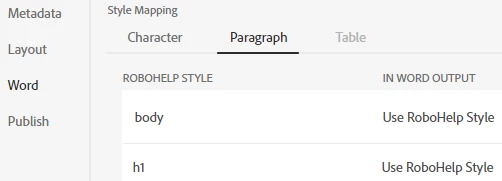
When I look at the Style Mapping (in the Word Output Presets), it only shows me the styles set in the layout.css file.


Am I missing something or is this correct?


Thanks!


    This topic has been closed for replies.
    Correct answer Peter Grainge

    In my page about Word templates I say:


    The idea of these is that layout.css defines the appearance of the elements of the page that are not coming from the content such as the TOC, the Index, headers and footers and so on. Then content.css provides a single CSS for the content. As the print outputs are a single document, the topics must all have the same CSS applied.


    What that means is in the sections of the document that are not your topics, for example your TOC, those are the styles that need to be defined in llayout.css.


    Later I say:

    If your topics only reference one CSS throughout the project, you do not need a CSS in the page layout for the content, only the elements of the layout itself need to be defined.

    If different topics reference more than one CSS, you need to define a single CSS for the content in print outputs, as explained above. That CSS needs to be the Stylesheets group in the template, not elsewhere in your project.


    That is pretty clear and I think you understood that bit. In addition, you might have defined one CSS for online but want something different in print. You could define that here. Maybe just copy in the online CSS and edit that as required for print.


    If you want and only one css is used in topics, content.css can be deleted.


    Does that clarify it and work for you?

    ________________________________________________________

    My site www.grainge.org includes many free Authoring and RoboHelp resources that may be of help.


    7 replies

    Peter Grainge
    Community Expert
    Community Expert
    January 23, 2023

    This has been accepted as a bug to be fixed in an update.

    ________________________________________________________

    My site www.grainge.org includes many free Authoring and RoboHelp resources that may be of help.


    Use the menu (bottom right) to mark the Best Answer or Highlight particularly useful replies. Found the answer elsewhere? Share it here.

    Known Participant
    January 23, 2023

    Thank you!

    Peter Grainge
    Community Expert
    Community Expert
    January 20, 2023

    It's looking like a bug. I will be re-testing it later. Also I should be speaking to someone at Adobe soon and will flag it then.

    ________________________________________________________

    My site www.grainge.org includes many free Authoring and RoboHelp resources that may be of help.


    Use the menu (bottom right) to mark the Best Answer or Highlight particularly useful replies. Found the answer elsewhere? Share it here.

    Known Participant
    January 20, 2023

    Thank you for looking at this for me!

    Peter Grainge
    Community Expert
    Community Expert
    January 19, 2023

    I think this is where you need to edit the TOC heading.


    ________________________________________________________

    My site www.grainge.org includes many free Authoring and RoboHelp resources that may be of help.


    Use the menu (bottom right) to mark the Best Answer or Highlight particularly useful replies. Found the answer elsewhere? Share it here.

    Known Participant
    January 19, 2023

    Here's what it looks like in RH...


    Here's what I get in Word...


    Peter Grainge
    Community Expert
    Peter GraingeCommunity ExpertCorrect answer
    Community Expert
    January 18, 2023

    In my page about Word templates I say:


    The idea of these is that layout.css defines the appearance of the elements of the page that are not coming from the content such as the TOC, the Index, headers and footers and so on. Then content.css provides a single CSS for the content. As the print outputs are a single document, the topics must all have the same CSS applied.


    What that means is in the sections of the document that are not your topics, for example your TOC, those are the styles that need to be defined in llayout.css.


    Later I say:

    If your topics only reference one CSS throughout the project, you do not need a CSS in the page layout for the content, only the elements of the layout itself need to be defined.

    If different topics reference more than one CSS, you need to define a single CSS for the content in print outputs, as explained above. That CSS needs to be the Stylesheets group in the template, not elsewhere in your project.


    That is pretty clear and I think you understood that bit. In addition, you might have defined one CSS for online but want something different in print. You could define that here. Maybe just copy in the online CSS and edit that as required for print.


    If you want and only one css is used in topics, content.css can be deleted.


    Does that clarify it and work for you?

    ________________________________________________________

    My site www.grainge.org includes many free Authoring and RoboHelp resources that may be of help.


    Use the menu (bottom right) to mark the Best Answer or Highlight particularly useful replies. Found the answer elsewhere? Share it here.
    Peter Grainge
    Community Expert
    Community Expert
    January 19, 2023

    I have checked with Adobe that what I have posted is correct. If on further testing you find the same, it will help others if you mark the explanation as correct.

    ________________________________________________________

    My site www.grainge.org includes many free Authoring and RoboHelp resources that may be of help.


    Use the menu (bottom right) to mark the Best Answer or Highlight particularly useful replies. Found the answer elsewhere? Share it here.

    Known Participant
    January 19, 2023

    Peter,

    Thanks for your help!  I went back and reread your post and I also opened the About RohoHelp project.  The About RoboHelp project showed that, because my projects use a different css for Word, both css files need to get added into the Page Layout files.  Once I did that, everything fell into place.  I've just about got everything moved into RH2022.


    I hope that every RoboHelp user appreciates all the time you put into your website and monitoring this forum!  Thanks!

    Peter Grainge
    Community Expert
    Community Expert
    January 17, 2023

    Thinking some more and without testing, I don't think your topic styles should be in layout.css.

    ________________________________________________________

    My site www.grainge.org includes many free Authoring and RoboHelp resources that may be of help.


    Use the menu (bottom right) to mark the Best Answer or Highlight particularly useful replies. Found the answer elsewhere? Share it here.
    Known Participant
    January 17, 2023

    I don't think so either but they're not seen otherwise.


    I read thru the Layout and Content Clashes section and what you wrote makes sense but, unless I'm missing something, the program doesn't seem to work that way.  The content.css doesn't appear to be seen at all.


    When I go into the Preset and look at the Word section, I only see styles contained in the layout.css file.


    I really appeciate all your help!

    Peter Grainge
    Community Expert
    Community Expert
    January 17, 2023

    The changes are confusing and I'm still feeling my way. See if the Layout and Content Clashes section of that topic helps. 

    ________________________________________________________

    My site www.grainge.org includes many free Authoring and RoboHelp resources that may be of help.


    Use the menu (bottom right) to mark the Best Answer or Highlight particularly useful replies. Found the answer elsewhere? Share it here.
    Peter Grainge
    Community Expert
    Community Expert
    January 17, 2023

    See RH2022 Word Templates (grainge.org).


    Essentially it is so that if you export the template to another project, it carries with it everything to make it work.

    ________________________________________________________

    My site www.grainge.org includes many free Authoring and RoboHelp resources that may be of help.


    Use the menu (bottom right) to mark the Best Answer or Highlight particularly useful replies. Found the answer elsewhere? Share it here.
    Known Participant
    January 17, 2023

    Peter,


    Here's where I got confused.  From your website, "In a new template both layout.css and content.css will be included in the header of the page layout.".  I assumed that both css files would be included in the Page Layout so that when I changed the content.css, the page layouts would automatically see the change.