
Known Participant
June 2, 2011
Answered

RH 9.01 Table Captions Format Problem

  • June 2, 2011
  • 1 reply
  • 722 views

I created WebHelp in RH 8 / TCS 2.5. The table captions are fine, Arial, Blue, Italic

I made a few minor updates to the table contents (not the caption) in FM 10 / TCS 3.0.

I open the project in RH9 / TCS 3.0 and regenerate.

The table caption is Times Roman black.

I cannot modify the table caption format to be anything else besides Times Roman black.

The RH files show the correct format.

Here's what I tried:

I tried manually inserting a table and formatting the caption.

I tried creating a CHM file instead of a WebHelp file. Same problem.

I tried with two different projects. Same problem.

I did not try creating a new project.

Am I missing something, or is this a bug?

Thanks for any clues.

I tried attaching screenshots here, but I must have some IE setting disabled because nothing happens when I click the camera.
This topic has been closed for replies.
Correct answer Captiv8r

Welcome to our community

I'll begin by saying openly that I'm a big ole Frame ignoramous. I'm a RoboHelp guy.

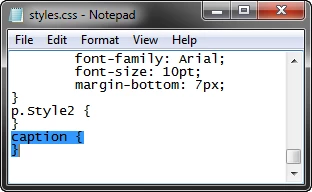
I find that in order to specifically style my table captions I first need to edit the CSS file using Windows notepad. Pop the following code somewhere in the file:

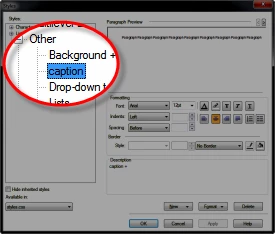
Once you do this your Styles dialog will have a caption entry in the Other category that you may format.

Seems to work on my own setup. Hopefully it will work for you.

Cheers... Rick

Helpful and Handy Links

RoboHelp Wish Form/Bug Reporting Form

Begin learning RoboHelp HTML 7, 8 or 9 within the day!

Adobe Certified RoboHelp HTML Training

SorcerStone Blog

RoboHelp eBooks

1 reply

Known Participant
June 2, 2011

I also tried formatting a paragraph outside of the table and it works fine. It has something to do with the fact that it's a table caption.

Captiv8r
Captiv8rCorrect answer
Legend
June 3, 2011

Welcome to our community

I'll begin by saying openly that I'm a big ole Frame ignoramous. I'm a RoboHelp guy.

I find that in order to specifically style my table captions I first need to edit the CSS file using Windows notepad. Pop the following code somewhere in the file:

Once you do this your Styles dialog will have a caption entry in the Other category that you may format.

Seems to work on my own setup. Hopefully it will work for you.

Cheers... Rick

Helpful and Handy Links

RoboHelp Wish Form/Bug Reporting Form

Begin learning RoboHelp HTML 7, 8 or 9 within the day!

Adobe Certified RoboHelp HTML Training

SorcerStone Blog

RoboHelp eBooks

Known Participant
June 3, 2011

THANK YOU!

This works perfectly.

I figured I needed something called caption, but when I tried to add it in the Styles dialog

directly, it wouldn't let me--said there was already a caption paragraph style.

I tried this with both of the projects and it worked in both of them.

Thanks again!

Karla