


Participant
September 6, 2012
Question

RH for Word 9 - Unable to Perform Actions

  • September 6, 2012
  • 3 replies
  • 899 views

I've just started using RoboHelp for Word 9 (I have more experience with RoboHelp HTML). As a little background I am working off of a Windows 7 computer using Word 2010. RoboHelp starts up and doesn't crash or freeze, but it does something I find odd: it has a phantom dialog box. I can edit the open word document, but whenever I try to perform an action in RoboHelp itself (e.g., create a new topic or import a document) I receive this error:
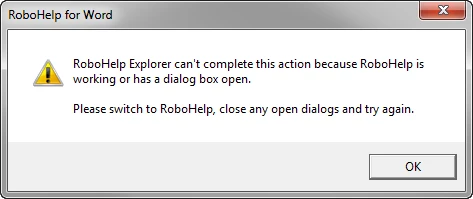


There is no such dialog box open, at least not one that is visible. This is severely messing with my inner calm lately, so any help the community can provide would be MOST appreciated.

This topic is closed to new replies. Start a new post to keep the conversation going.

3 replies

RoboColum_n_
Legend
September 7, 2012

Like Rick I'm not sure the phrases "RH for Word" and "inner calm" should belong in the same sentence. Have you tried looking in your Task Manager to see if that gives any clues.

Peter Grainge
Community Expert
Community Expert
September 7, 2012

A guess but try changing the security settings in Word to the lowest level.

Also have you been using two screens, could the dialog be on the second screen.


See www.grainge.org for RoboHelp and Authoring tips

@petergrainge

Use the menu (bottom right) to mark the Best Answer or Highlight particularly useful replies. Found the answer elsewhere? Share it here.
Captiv8r
Legend
September 6, 2012

LOL, inner calm and RoboHelp for Word. Like trying to mix oil and water for me!