
Inspiring
April 5, 2018
Question

RH HTML 2015. Image preview not working for some PNGs during Insert image.

  • April 5, 2018
  • 1 reply
  • 331 views

I have five PNG files in a topic do not "preview" when selected in Insert > Image. The Preview pane displays a red box.
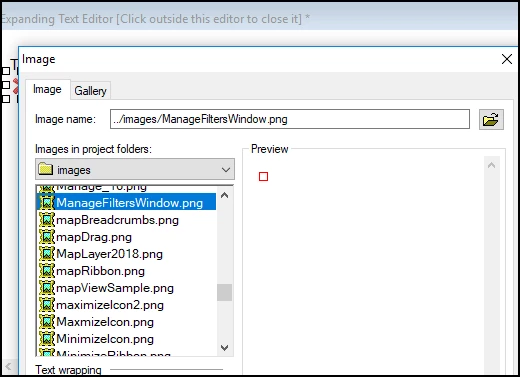
When I preview the topic, the images appear correctly.

I thought that the file names might be too long, but I verified that other PNGs with lengthy file names appear correctly.

I thought that the PNGs might be too larger, but other PNGs of greater size preview correctly.

Are there any restrictions related to images in terms of file name length or size?

Thanks for any help on this issue.

Regards,

Carol Levine

This topic has been closed for replies.

1 reply

Peter Grainge
Community Expert
Community Expert
April 5, 2018

I have seen that happen. I think I deleted the image from RoboHelp and then imported it again. Also try copying the file into the RoboHelp folders and then add it to the topic. It's a case of messing about a bit.Ultimately as long as they can be seen by you and in the outputs, I wouldn't worry too much.


See www.grainge.org for free RoboHelp and Authoring information.

@petergrainge

Use the menu (bottom right) to mark the Best Answer or Highlight particularly useful replies. Found the answer elsewhere? Share it here.
Inspiring
April 5, 2018

Thanks, Peter!

We work from Source Control and those images were missing after I got a new machine and “Got” the project from Source Control to my local workspace. So I found them in a previous project, copied them to the images folder, imported them, etc. Still did not appear.

After I posted the question, the preview suddenly began to work. A bit of magic afoot!

Perhaps RoboHelp & Source Control were just being a tad slow earlier today.

Kind regards,