Inspiring
December 30, 2015
Answered

RH HTML: Outputting Specific Topics for Review

  • December 30, 2015
  • 2 replies
  • 408 views

I just finished a major update and have about 70 topics (out of approx. 900) that have to go to SMEs for  review. The 70 mainly have tables of GUI field names and descriptions and the SME will have to provide any missing/outdated descriptions. So I want to generate an output, preferably Word, that the SME can review and update as needed. But even after I condition out the books that I don't need to send, the generated Word file is missing great chunks of material.

I've also tried copying/pasting the tables to Excel and Word without luck.

Any ideas are appreciated.

This topic has been closed for replies.
Correct answer KimberlyO

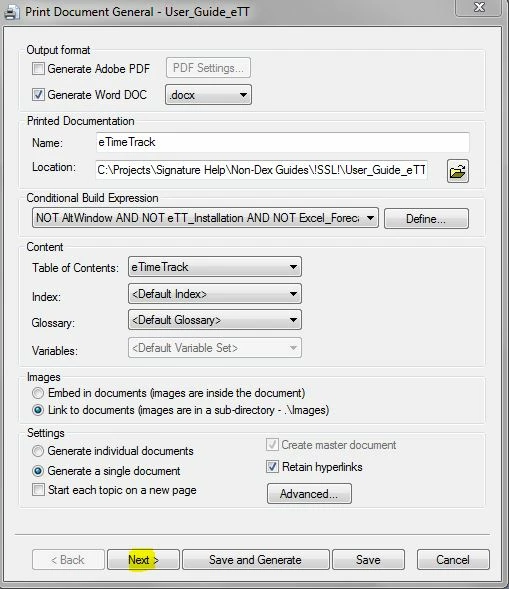
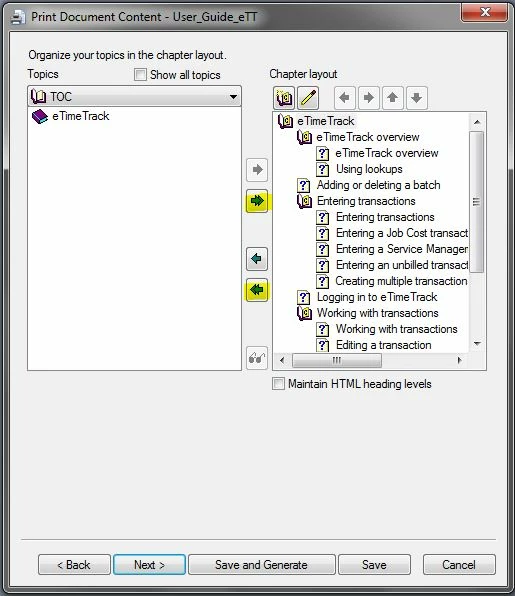
The Word output window has several screens that you can move through. (The .CHM output only has one window.)  Instead of choosing Save and Generate, choose Next.  In the second screen, choose the double arrows pointing to the left to remove all of the topics and then either choose the double arrows to add all of the topics back OR just include the sections that you want reviewed.  If you've conditioned out specific topics BUT you add the topics, they will show in the Word document. Conditioned text within a topic won't display.

Note that my screenshots are from RH10.

First window:

Screen 2:

2 replies

KimberlyO
KimberlyOCorrect answer
Inspiring
December 30, 2015

The Word output window has several screens that you can move through. (The .CHM output only has one window.)  Instead of choosing Save and Generate, choose Next.  In the second screen, choose the double arrows pointing to the left to remove all of the topics and then either choose the double arrows to add all of the topics back OR just include the sections that you want reviewed.  If you've conditioned out specific topics BUT you add the topics, they will show in the Word document. Conditioned text within a topic won't display.

Note that my screenshots are from RH10.

First window:

Screen 2:

rphox2003Author
Inspiring
December 30, 2015

Thanks. Found it after I posted (which I deleted). Never noticed the Next button before as I've only generated Web and CHM outputs. Thanks to all.

Willam van Weelden
Inspiring
December 30, 2015

You may want to give the PDF review a look: I Came, I Saw, I Learned...: Adobe RoboHelp 9: PDF Review

For the Word file, did you include all topics you want in the output settings? Printed documenation works different from web outputs in that you need to select all topics you want to include.