
Known Participant
May 23, 2017
Question

RH Search not working in files with all-cap filenames

  • May 23, 2017
  • 3 replies
  • 2057 views

Hi all,

This one has me stumped.

Some of the files in our RH projects are in all upper-case.  In these all-cap files, the RH search isn't working, even if I copy'n'paste the term from the content into the Find box.  (It DOES work if I search the source, but just searching the page doesn't.)

If I duplicate the file and the dupe is in lower-case, search works like you'd expect.

In the example below, the same term is in both of these files. But you can only get a search result on the acheck file -- the ACTRENUM one returns zilch.
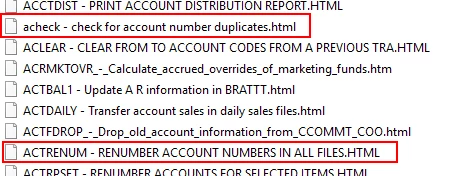
My *guess* is the problem is more with the .HTML extension than the filename itself, but a guess is all it is.

Has anyone seen this before? And maybe encountered a way to fix it without duplicating possibly dozens of files? (This is RH 2015 btw)

Thanks!

Christian

This topic has been closed for replies.

3 replies

Known Participant
May 23, 2017

For anyone who wants to follow this drama, the bug ticket is:

Tracker

Thanks!

Captiv8r
Legend
May 23, 2017

Thanks.

Jeff_Coatsworth
Community Expert
Community Expert
May 23, 2017

@Cletus - I'm unsure where the problem is occurring - in the RH project itself or in the generated output files from that project?

Known Participant
May 23, 2017

This is inside the project itself. Searching in Robohelp won't find results in these files.

Once it's published, text search in the browser works as anticipated.

Thanks!

Jeff_Coatsworth
Community Expert
Community Expert
May 23, 2017

Is it happening with RH topics you create "fresh"? (I ask because I suspect those .HTML topics have come from someplace else)

Captiv8r
Legend
May 23, 2017

Hi there

First I've seen of this. Wondering what your output type is? If it's WebHelp, you may be in luck as there should be an option to convert all your files to lower case.

Cheers... Rick