


Answered
I had an idea over the weekend. I think you have a font-size specificed on the span tag.
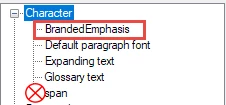
For a quick fix, if you look under "Character styles" I think you'll find one called 'span'. Double-click on it, select Format > Font and delete the value in the Size field.
Otherwise you could look in the stylesheet code using a text editor and find a style like this, and delete the font-size entry.
span {
properties: here;
properties: here;
}
I'd recommend deleting the span style itself. This is because the span tag is used for all inline styling, so setting styles in your stylesheet can mess that up. Instead set up separate styles for any formatting you want.
If you've used the span tag with the stylesheet styling, I think you'll have some manual tidying up to do though, so test in a copy of your project first.
For Classic, create the style by right-clicking on the Character styles entry and selecting New, then typing a name for the style (e.g. BrandedEmphasis). Behind the scenes this creates a css style that looks like this:
span.BrandedEmphasis {
font-size: 12pt;
color: #ff00ff;
font-weight: bold;
}
 AdChoices