
Inspiring
March 18, 2015
Answered

RH10 Conditional Text Not Applying in Webhelp Output

  • March 18, 2015
  • 1 reply
  • 896 views

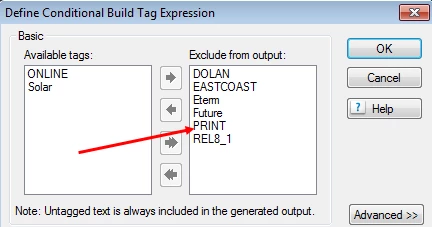
Hoping you all can help. Using RH10. I have many projects that are compiled with a different conditional text (online vs print, etc). For the last release cycle, although the Project's content Conditional Build Expressions list excludes the text appropriately:
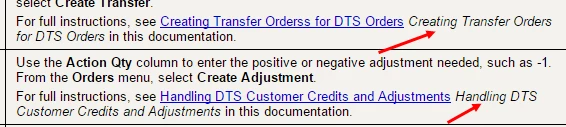
That text still displays in the WebHelp output:
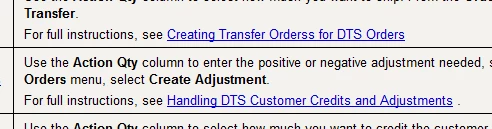
I didn't change anything in the way the compiled help is being generated since the last release. I double checked that last release's output to be certain. This is what it should look like:
Did some change in an upgrade?

Has anyone else run into this?

How do I fix it without rebuilding a project that has 100s of files?

Thanks...

Dawn

This topic has been closed for replies.
Correct answer KDawnMiller

Fair enough. Thanks, Jeff. LOL


Circling back to answer this one. I found that the way the browser cached files was part of the problem. Additionally, there were indeed projects that had not had the conditional text applied. While I still stumble across this from time to time, it's generally that the conditional text is not right and the project needed to be regenerated.

1 reply

Jeff_Coatsworth
Community Expert
Community Expert
March 18, 2015

Nope, haven’t noticed any change in my RH10 Webhelp output – have you had a look at that example’s topic? What’s the HTML look like? Are you seeing the correct CBTs applied?

Inspiring
March 18, 2015

Hi Jeff, I am seeing the correct CBTs applied, yes. I confess, it's been a while since I checked it, but this looks accurate:

<?rh-cbt_start condition="ONLINE" ?><a

     href="SALES_OVW_DirectThroughStockOrders.htm">Direct-Through-Stock

Orders</a><?rh-cbt_end ?><?rh-cbt_start condition="PRINT" ?> <?rh-cbt_end ?><?rh-cbt_start condition="PRINT" ?><span

     style="font-style: italic;">Direct-Through-Stock Orders Overview</span><?rh-cbt_end ?><?rh-cbt_start condition="PRINT" ?>

in this section<?rh-cbt_end ?>

It's so ODD that it's doing this.

Jeff_Coatsworth
Community Expert
Community Expert
March 18, 2015

Try renaming the .cpd file of the project outside of RH and then reopen it? Won’t hurt anything.