

Flaven
Inspiring
July 26, 2012
Answered

RH10 Corrupts Bookmark Links on Drop-down Text Link

  • July 26, 2012
  • 19 replies
  • 3837 views

I've noticed that when upgrading RH9 projects to RH10, that RH10 will corrupt (e.g., "Broken Link") all bookmarks set on a drop-down text link. For example, I have a head "Changing the Status in PowerFlow" which when clicked, drops-down a chunk of text. The head is also included as a bookmark, "Changing_the_Status_in_PowerFlow".

These all worked perfectly in RH9 and I've tested the upgrade to RH10 multiple times with the exact same outcome. Bookmarks not associated with drop-down text are unaffected. Note the three MM-4000 broken links, which are associated with drop-downs; there is a fourth bookmark, not associated with a drop-down link, that is accessible:
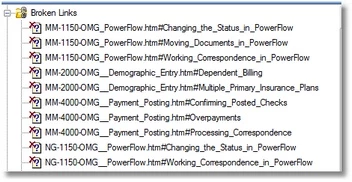
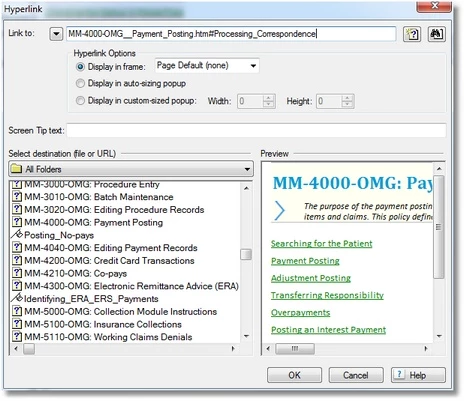
RH10 inserts a "#" into the bookmark link, producing a "The filename is invalid. The "#" character cannot be used in a path." error. The bookmarks no longer show up in Project Files, but do show on the topic page (with highlighting) and in the bookmark dialog, but the bookmark on the page does not get selected -- as normal -- in the bookmark dialog.

When compiled as a WebHelp project, the bookmarks work as expected. I'm not sure what the correct syntax is for a legit bookmark, and searching for "#Changing..." and deleting the "#" removes the selection from the Broken Links list, but changes no other behavior.

If anyone has any other fixit ideas, I'd be appreciative: I have hundreds of these throughout multiple projects. Thanks...

This topic is closed to new replies. Start a new post to keep the conversation going.
Correct answer Praful_Jain

Thank you, Praful. I sent you a zip file via YouSendIt and you should have received a notification by now from YouSendIt that the file is available for download. If you have not received the notification, please check your spam folder (I love telling people to do that...<G>)--or I can send you the download link directly.


hi Flaven,

I downloaded the project file, and looked at the issue. The issue is very specific, just to let all the other people aware, the issue, if you create a DHTML text (dropdown or expanding), and then on that DHTML text you apply bookmark, then upgrade the project to RH10, the bookmark does not appear.

The same is the case if you create a new project in RH10 and add bookmark to DHTML text, then bookmark does not appear in the project mgr pod.

I have a fix for this issue, the fix is to run a script which is shared @ https://acrobat.com/#d=iwwPZbRDHT-oJ1gSp6Kc6w

you need to follow the following steps

  • Download the script file.
  • Open RoboHelp project, click View>pod>script Explorer
  • in the script explorer, right click and select import and select the downloaded script file.
  • Take backup of your project where DHTML issue is happening.
  • Open the project, open the script explorer pod, right click on the new script file and select run.
  • the script will fix the whole project and all the bookmarks will start working fine.

The script is just a workaround, till the time RoboHelp engineering team fixes this issue,

thanks

Praful Jain

Adobe RoboHelp team

19 replies

Peter Grainge
Community Expert
Community Expert
July 30, 2012

Ross

I just created a dropdown in a Rh9 project and bookmarked it. In another topic I created a link to the bookmark and tested it. It worked as expected.

Then I upgraded the project to Rh10 and it still worked.

Are you able to create a new project in Rh9 and test the upgrade with that?


See www.grainge.org for RoboHelp and Authoring tips

@petergrainge

Use the menu (bottom right) to mark the Best Answer or Highlight particularly useful replies. Found the answer elsewhere? Share it here.
Flaven
FlavenAuthor
Inspiring
July 30, 2012

Thanks, Peter. New bookmarks of this sort in RH10 work as expected. I uninstalled RH9 and am only working in RH10 at this point--for whatever reason, every single project I had previously created (or upgraded to) in RH9 express this odd behavior, so it may be a carryover from RH7 to RH8 to Rh9...you get the drift. Since the bookmarks work, despite the Broken Link report, I'm leaving well enough alone at this point. If others experience a similar oddity, then it may be worth follow-up--since it's just me at this point...

Peter Grainge
Community Expert
Community Expert
July 30, 2012

If you're happy with it, I'm happy. Will keep this in mind if anyone else posts.


See www.grainge.org for RoboHelp and Authoring tips

@petergrainge

Use the menu (bottom right) to mark the Best Answer or Highlight particularly useful replies. Found the answer elsewhere? Share it here.