
Known Participant
April 16, 2014
Answered

RH10 issue: bullet & numbered lists not showing correctly in web broswers

  • April 16, 2014
  • 2 replies
  • 424 views

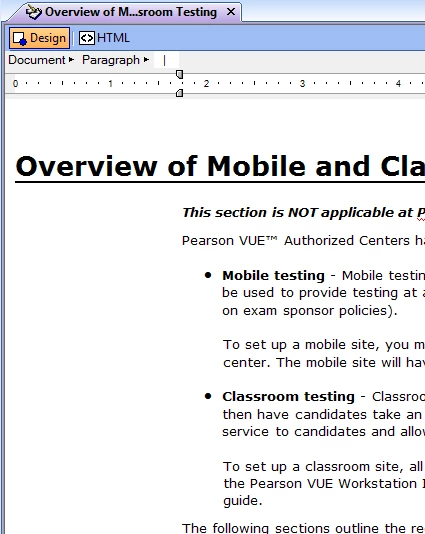
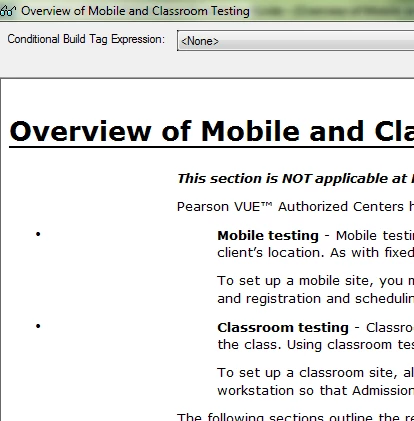
My team is running into a problem with auto generated lists in RH10. When you create a bullet/numbered list in RH or import a document with bullet/numbered lists, the lists show up correctly in design view. However, once you view the topic in a web browser, the bullet points and numbers appear to the far left. Anyone have any ideas on what's going on and how we can fix this? I've included images below.

Design view (shows correctly):
Web broswer view (issue is appearing in both IE and Chrome):
This topic has been closed for replies.
Correct answer Jeff_Coatsworth

There’s been a number of posts on this topic – it usually comes down to tweaking your css

2 replies

Peter Grainge
Community Expert
Community Expert
April 17, 2014

Maybe the Lists topics on my site will help.

My guess is the problem is based on the CSS created when you import Word Doc files. There is also information on my site about Importing that may help there.


See www.grainge.org for RoboHelp and Authoring tips

@petergrainge

Use the menu (bottom right) to mark the Best Answer or Highlight particularly useful replies. Found the answer elsewhere? Share it here.
Jeff_Coatsworth
Community Expert
Jeff_CoatsworthCommunity ExpertCorrect answer
Community Expert
April 16, 2014

There’s been a number of posts on this topic – it usually comes down to tweaking your css
