
Participating Frequently
December 10, 2013
Question

RH10 Missing TOC when viewed using IE11

  • December 10, 2013
  • 3 replies
  • 1987 views

I have generated webhelp using RH10.  The webhelp works fine with both Firefox and Chrome but when I display the webhelp from my local machine using IE11 the TOC is missing.

Here is a screenshot.
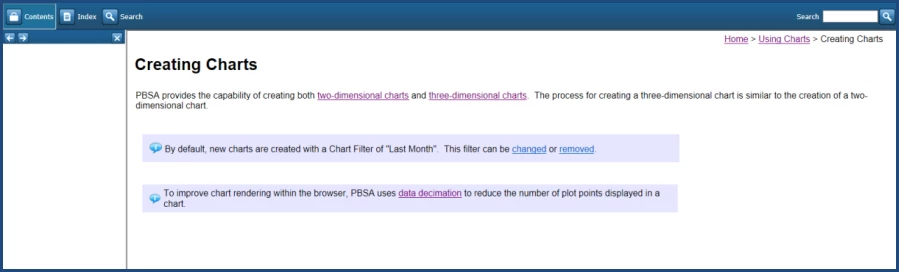
I also notice that the index is missing as well.

This topic has been closed for replies.

3 replies

Flaven
Inspiring
January 14, 2014

RoboHelp 11 fixes this particular issue.

Known Participant
January 19, 2014

I received an email advising that RH11 fixes the IE11 issues. With great hopes I advised my colleagues, one of whom downloaded the RH11 trial download to install and test their webhelp output.

After converting two of his webhelp projects, unfortunately, RH11 DOES NOT appear to fix the IE11 problems - the table of contents is still missing after importing projects and regenerating webhelp.

C'mon Adobe - a supposed "fix" should work seamlessly first time out of the box.

Peter Grainge
Community Expert
Community Expert
January 20, 2014

Could the answer be as in posts 7 and 8 at http://forums.adobe.com/message/6030838?tstart=0#6030838 ?


See www.grainge.org for RoboHelp and Authoring tips

@petergrainge

Use the menu (bottom right) to mark the Best Answer or Highlight particularly useful replies. Found the answer elsewhere? Share it here.
Known Participant
December 11, 2013

RH10 webhelp in IE11 does not work and is a known bug that has been reported to Adobe.

If you run the developer tools in IE11 (F12 key), select the Emulation Tab and change Document Mode from Edge (default) to 10, you will find your webhelp displays correctly.

This is something that MS has introduced in IE11. However, no one has yet suggested a way to make this setting "stick" once the developer tools are closed.

Report this issue as a bug to Adobe - the more users report it, the earlier Adobe may start working on a fix.

There is another work around, forcing IE11 to open the site in an earlier version emulation mode, but apparently this causes problems for users of IE whose version is not the same as the forced mode.

Have a look at earlier posts on this forum about this subject.

Jeff_Coatsworth
Community Expert
Community Expert
December 10, 2013

Run in Compatibility mode and add the location as a Trusted Site