July 27, 2012
Answered

RH10 Multiscreen HTML 5 support - glossary issue

  • July 27, 2012
  • 1 reply
  • 2395 views

Hi,

I'm currently evaluating the new version of RH10.

I'm trying out the new Multiscreen HTML 5 layouts and have set up a desktop layout and am investigating configuring it for my company's look & feel.

The Multiscreen settings dialog gives you the option to select a TOC, Index, Glossary, etc of your choice, but it doesn't appear to let you opt out of using one! How can I opt out of having a glossary? RH8 allowed you to choose which tabs you wanted.

Am I missing something?

Thanks for any help.

Feebeegeebee

This topic has been closed for replies.
Correct answer Willam van Weelden

Hi,

Wow, the release is only a day old and we find the first HTML5 post

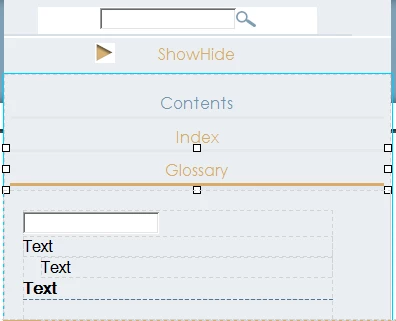
If you want to opt out, you must amend the screen layout so that that information is excluded. For example the Desktop Layout. Now select the Glossary/Index/TOC element so that squares around the element, such as this:

Now simply press Delete to remove the tab from the output. Do this for all the pages that the glossary can be accessed. (Home page, topic and search results.)

Greet,

Willam

1 reply

Willam van Weelden
Willam van WeeldenCorrect answer
Inspiring
July 27, 2012

Hi,

Wow, the release is only a day old and we find the first HTML5 post

If you want to opt out, you must amend the screen layout so that that information is excluded. For example the Desktop Layout. Now select the Glossary/Index/TOC element so that squares around the element, such as this:

Now simply press Delete to remove the tab from the output. Do this for all the pages that the glossary can be accessed. (Home page, topic and search results.)

Greet,

Willam

July 27, 2012

Hi Willam,

Excellent. Thank you. That wasn't entirely clear.

I'll give it a go!

Regards,

Feebeegeebee

Known Participant
January 9, 2013

Feebee,

I just saw this positng and wondered if the solution Willam gave worked for you.  I too am trying to remove the glossary buttons

Thanks

Mike