
Known Participant
October 9, 2013
Question

Rh10 sets Apply to All Topics importing from Fm

  • October 9, 2013
  • 1 reply
  • 1141 views

I've found some really strange issues converting RH9 projects to RH10. One of the things I noticed is the Text fomatting issue. In RH9, every page I created would have it's own .css page, which are listed in the Project Master -> Project Files folder. RH9 would apply every .css to the individual pages I had automatically. 

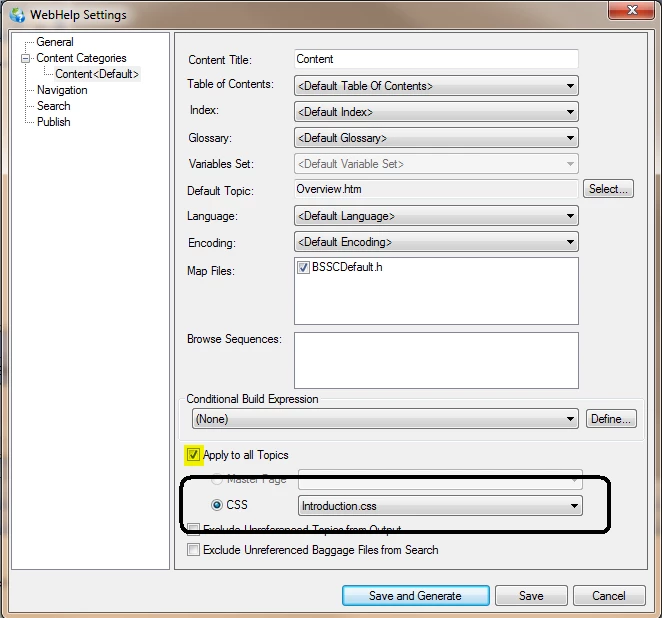
Now in RH10, I found that none of the .css pages were being applied, and I have to pick one in the WebHelp settings and select "Apply to All".  Not sure why this has changed but it was the only thing that would make all pages of my project have the same Styles and Formatting:
This topic has been closed for replies.

1 reply

Peter Grainge
Community Expert
Community Expert
October 9, 2013

The Apply to All Topics is selected. That is not a default. Deselect it and the CSS for the topics will apply.

Do you really mean you have one CSS per topic? I'm curious to know why.


See www.grainge.org for RoboHelp and Authoring tips

@petergrainge

Use the menu (bottom right) to mark the Best Answer or Highlight particularly useful replies. Found the answer elsewhere? Share it here.
lyddionAuthor
Known Participant
October 9, 2013

When I looked at my RH9 projects, I do have the 'Apply to all Topics' flag unselected, and the CSS for the individual topics are correct. When I converted to RH10, the flag setting isn't working anymore.

I was creating pages in FM and importing them to RH. I wasn't using a Master Page when I started, and was copying existing pages to create new ones. It became a (bad) habit.

I didn't think too much of it until I started having issues with RH10.