

RH11: How do I indent a hotspot question
Hi,
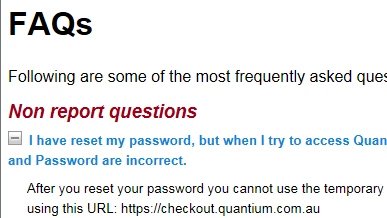
I finally learned how to used the twisties (I kept looking for show/hide functionality) but I can't seem to figure out where to indent the text that accompanies the twistie. I am creating an FAQ section for Responsive HTML5, and my first question is too long. I have gone through default.css (which is what I am using - I have not created any other style sheet) and layout.css - I cannot figure out where this can be fixed. I have not used any inline styles with the Drop-down hotspot style nor the 10pt_Arial style, which is the paragraph style I am using with the hotspot style.
I have checked all the Media on default.css to see if I can fix this for the Arial_10pt style and the Drop-down hotspot style, but I can't find an option to indent the question text.
Could someone please tell me how to indent this text?
Thanks so much!
Pam


 AdChoices