

RH11 Styles still won't apply in the CSS
I've been using RH11 since Jan., and struggling. I have had to manually change my styles in every topic because I can't get them to save in the default.css
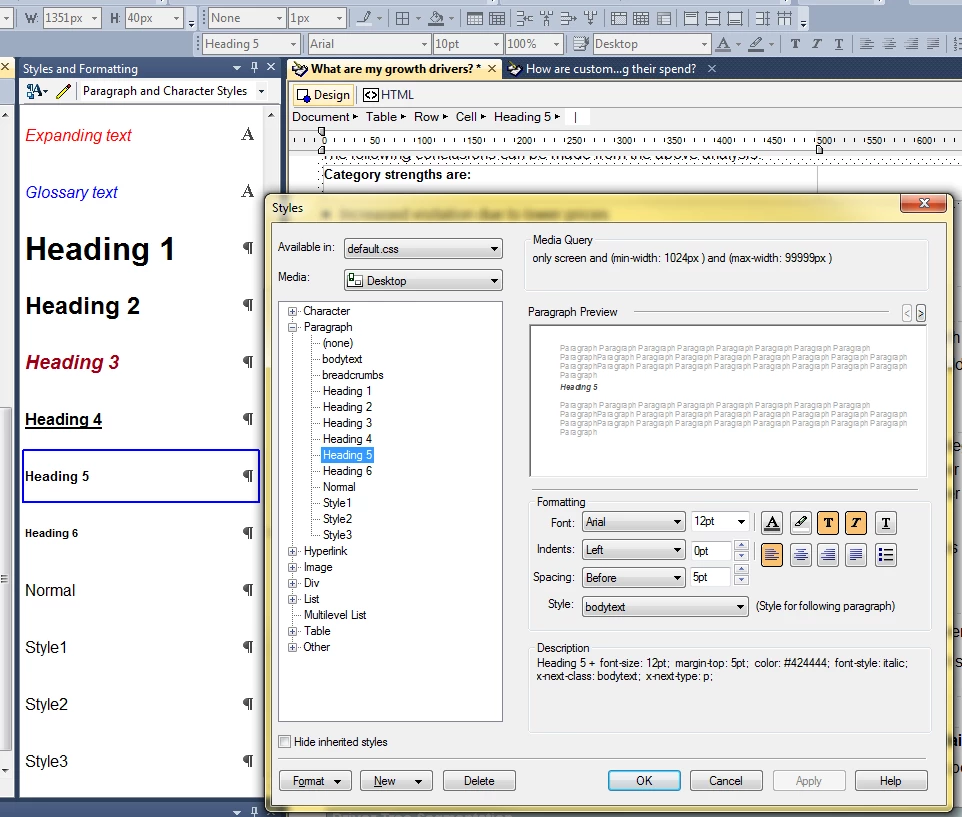
For example, today I would like to use Heading 5. So I opened the default.css, changed the font to Arial 12, changed the colour, clicked on Apply, then clicked on OK. Then I saved the project. However, when I attempt to use this style in my project, it reverts back to whatever style it was before I changed it. When I open the CSS again, the style is exactly the way I changed it, but the changes won't apply to the content in the Design Editor. I have had this problem since day 1. My numbered lists have 12pt text and 10 pt numbers. My bullets have 12pt text and 10 pt bullets.
In this example, Heading 5 has been changed and applied (and saved) to the first line of text in the graphic below ("Category strengths are:"). But if you look at the text and the font size in the toolbar, they are 10pt. Look at Heading 5 in the Styles window, it is 12pt. But RH will not accept my style changes. Please tell me how to get styles changes to apply in the CSS, or even when I want to create a new style. I have tons of pages in my project and doing everything manually is driving me nuts.
Thanks,
Pam


 AdChoices