
Inspiring
April 25, 2014
Question

RH11: Word export: Subchapters are generated with same heading as chapter above

  • April 25, 2014
  • 1 reply
  • 372 views

Dear community,

when I export my RH project to word, RH generates for each chapter (that has any subchapters) an additional subchapter with the same heading as the chapter above. In the project as in the chm export, the chapter does have content (as I want). But not in the word export.Here the chapter is empty,its content is put into that new subchapter. Got me?

You can see what is happening in the export dialog.
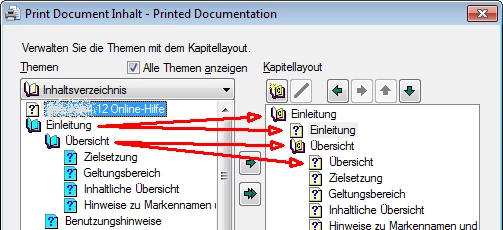
So whats happening there, what do I wrong?

Thanks for your support!

This topic has been closed for replies.

1 reply

Peter Grainge
Community Expert
Community Expert
April 25, 2014

It's to do with the Maintain Heading Levels setting. See Printed

Documentation on my site.

Use the menu (bottom right) to mark the Best Answer or Highlight particularly useful replies. Found the answer elsewhere? Share it here.
Inspiring
April 25, 2014

Dear Peter,

thanks for the hint/link.

pretty new to RH...

Philosophy understood but not what to get a solution...

I imported the project from word. RH splits the word document into topics, headings are the borders and the titles of the topic. Topics with sub topics will appear in RHs TOC as a book.

Books do get in word export the books heading, the first topic of the book still has on own heading and will appear as an own heading, too.

What I /the customer expect is the same structure of the word export like in the word import...

Any automatic solution to suppress the first topics title of the book to avoid a lot of manual work?

Peter Grainge
Community Expert
Community Expert
April 26, 2014

"headings are the borders and the titles of the topic"

The headings in Word can define the topics that are created. You select the Paginate option for those headings that you want to create topics.

Topics do not have sub-topics, they may have sections with titles based on lower level headings than you have defined for pagination.

I am really not clear on what you are trying to describe. When you reply, there is a camera icon. Please use that to insert some images to help.


See www.grainge.org for RoboHelp and Authoring tips

@petergrainge

Use the menu (bottom right) to mark the Best Answer or Highlight particularly useful replies. Found the answer elsewhere? Share it here.