
Auntie_Em-Pam
Known Participant
January 20, 2016
Question

RH2015 - can I change UI of Related Topic popup?

  • January 20, 2016
  • 2 replies
  • 532 views

Hi all,

Two questions about RH2015:

-  Is there a way to change the interface of the Related Topics popup? I don't see how I can do this in the code. It's a bit small for my taste.
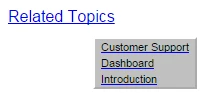
-  How can I bring in my template from RH11? Will everything from my existing Project come into RH2015 when I open it in RH2015? (I hesitate to open existing projects until I see if there are any bugs in RH2015. I have also gone through the entire RH2015 manual, and I have to say I am very disappointed that they copied and pasted from the old manual, and a lot of the procedures and icons are incorrect.)

Thanks,

Pam

This topic has been closed for replies.

2 replies

Auntie_Em-Pam
Known Participant
January 20, 2016

Thanks Peter. I'll check with my developers and see if they can find a workaround for the Related Topics popup. If we come up with a solution, I will post it.

Cheers,

Pam

Community Expert
January 20, 2016

You might be able to add something like this to your stylesheet - the class needed may vary depending on your output and RH version though - I used the developer tools in IE to find out the class name of the popup text. I tried this with Multiscreen HTML5 (in RH11, but I imagine it should be similar for RH2015).

You need the !important to override the styles that seems to be written by a script.

.PopupNotOver {

     font-size: 15pt !important;

     background-color: green !important;

}

Auntie_Em-Pam
Known Participant
January 22, 2016

Great - I'll show my developer so I don't muck it up! I'll let you know how it goes.

Cheers,

Pam

Peter Grainge
Community Expert
Community Expert
January 20, 2016

RELATED TOPICS

I've not seen anyone post that as a problem before and I'm not aware of any solution.

IMPORTING A PROJECT

You should never open a project in a new version without first creating a backup. I always recommend creating the backup as a zip file. That prevents you opening it accidentally and working on it before you realise it was the backup. This way you always have a clean backup that can be used to create a new clean copy of the backup time after time.

The import into Rh2015 should bring in the template and I haven't seen reports of problems in that respect.

HELP FILE

If you post any of the help file errors as bugs, then Adobe will work on them.


See www.grainge.org for RoboHelp and Authoring tips

@petergrainge

Use the menu (bottom right) to mark the Best Answer or Highlight particularly useful replies. Found the answer elsewhere? Share it here.