Inspiring
April 3, 2018
Answered

RH2015 TOC links in wrong color

  • April 3, 2018
  • 2 replies
  • 1114 views

I am using RH2015 and using the Charcoal_Grey responsive layout and when I preview or generate output the topic links in my TOC are blue and magenta instead of the default colors as defined in the Layout Customization dialog of (Selected color E1E1E1). Is there a way to override these to make them the defaults so the ouput looks like they should.

This topic has been closed for replies.
Correct answer Peter Grainge

Here is a screen shot in the Preview and it looks the same when I generate.
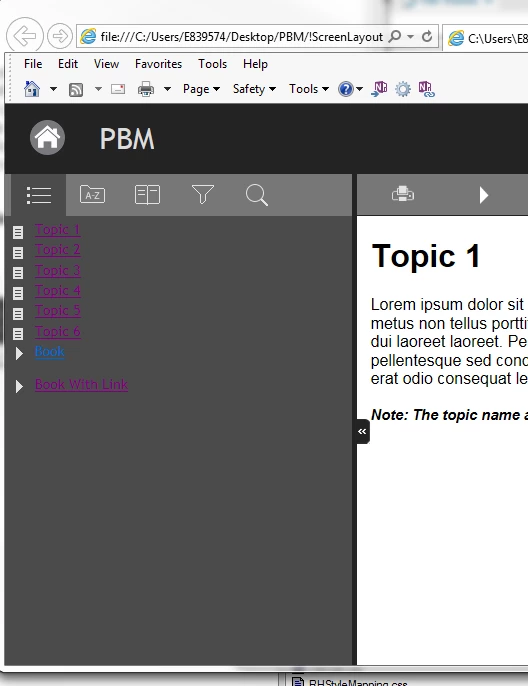
I did find another forum posting you were involved in, Peter, that is exactly what I did. The posting is called "TOC turns blue when I edit the logo placeholder on the header in layout.css" dated October 16, 2017 that you provided assistance. Here is the link to the posting: https://forums.adobe.com/message/9885549#9885549

Should I import a new clean layout.css from the Charcoal_Grey layout and just not update the sizing of it? I don't like this solution but thought I would ask. You seemed to get it to work, but I'm not sure how from the other posting. I'd appreciate any suggestions.


At a quick read it looks as if importing a new layout and setting the width first did the trick. I think I would leave your project alone and create a new project with just a few topics and try to get the layout working in that.

If that doesn't work and has the same problem, see the Contact page on my site and send the project as instructed there. Do make sure you include a link to this thread and please do not email the project direct.

I won't be able to look at it today and probably not tomorrow.


See www.grainge.org for free RoboHelp and Authoring information.

@petergrainge

2 replies

lisabj4Author
Inspiring
April 5, 2018

I am just using the image we have and keeping the size of the placeholder for it in layout.css as-is the default. I don't want anything to break again.

Peter Grainge
Community Expert
Community Expert
April 3, 2018

I have edited your post as you are using RoboHelp 2015. Using the correct name helps others when searching.

Are the affected links in topics that started life in Word?

If they are, look under Fixing the Import in Importing using RoboHelp Chances are there are some embedded styles.Even if they are not imports, look for something similar to that.


See www.grainge.org for free RoboHelp and Authoring information.

@petergrainge

Use the menu (bottom right) to mark the Best Answer or Highlight particularly useful replies. Found the answer elsewhere? Share it here.
lisabj4Author
Inspiring
April 3, 2018

In TOC list pane of topic links to view in the Charcoal_Grey layout when I generate a test system or do the preview option appear in the colors mentioned above. We did not use WORD to create our topics but created them from scratch as we currently output to WebHelp. I did look through the document you mentioned Peter, and found the following info and looked for the embedded style of the following in my topics and didn't locate this embedded style probably because we didn't start with WORD docs but it did refer to the links being a certain color so looked anyway:

<style type="text/css">/*<![CDATA[*/

          A:visited {

          color: #800080;

          }

          A:link {

          color: #0000ff;

          }

          /*]]>*/</style>

As I mentioned before I am trying to use the existing topics from our webhelp output for the responsiveHTML5 output and I'm running into goofy problems. The non-grey coloring for the topics in the TOC list is one of them. Also my back and forward buttons appear in the preview mode, but do not in my generated output. Sorry to introduce another issue.

Jeff_Coatsworth
Community Expert
Community Expert
April 3, 2018

What css is being used in the topics? Have you checked that it's properly defining the links?
