
Participating Frequently
December 1, 2017
Question

RH2017 (1) Responsive Layouts - Image File Names in Search?

  • December 1, 2017
  • 3 replies
  • 612 views

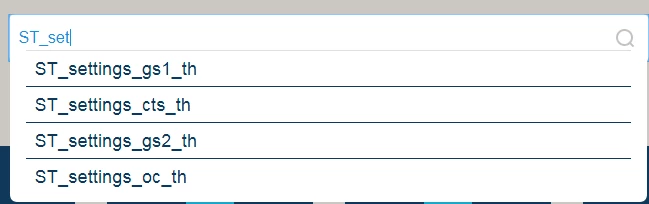
I'm testing a nearly finished help module, and I'm seeing image file names when I using the search function. I've tried all the layouts. It happens in each. It isn't happening in other modules I've created using the same starter module, so I'm at a loss. 
This topic has been closed for replies.

3 replies

peytonishAuthor
Participating Frequently
December 5, 2017

On further inspection, I have this problem on my existing modules as well. They're using Azure which does not offer suggested search terms, so it's not visible to the user.

Some things I've found...

In any module using only RH2015 layouts (Charcoal and Azure), there are no suggested search terms, so the problem is hidden.

If I output new or existing help modules to a 2017 layout that does offer the search term suggestions in the drop down list, and then go back to a 2015 layout, SOMETIMES, the 2015 layouts begin presenting the same suggested search terms similar to the example image. This is why I thought all of the layouts were doing it.

Two questions:

  1. This doesn't change the fact that I'm able to search image names. Is anyone else?
  2. Is there a way to disable the drop down list of search terms? It's offering ridiculous things. I type a couple of words and it offers random sentences containing those words.

I also tested with Multiscreen. I can't search by image names there or webhelp. The issue seems to be confined to Responsive 2017 layouts only.

Peter Grainge
Community Expert
Community Expert
December 7, 2017

It does seem to be a bug in all the layouts.

Please follow this link to report bugs and request features. The more people who do so, the higher it gets prioritised.

https://tracker.adobe.com

Post the link to that bug in this thread and others can vote for it.


See www.grainge.org for RoboHelp and Authoring information

@petergrainge

Use the menu (bottom right) to mark the Best Answer or Highlight particularly useful replies. Found the answer elsewhere? Share it here.
peytonishAuthor
Participating Frequently
December 7, 2017

I worked with Adobe on Tuesday. They're aware of it now.

Though, I've discovered something else that I need to pass on to them. They asked me to change the image names as a workaround. I tested this out by placing numbers at the beginning of the image names. It did stop them showing up in most searches unless I search by image name, but this started happening....

Usually, this was part or all of the ALT Text or Tip Text followed by the image name, but occasionally I couldn't find the text in the topic at all (including keywords assigned to the topic). A workaround was to add periods at the end of the Alt Text/Tip Text regardless of what actual words were appearing with the image file name (example: admin tabs).

I'll post the bug and include the information I discovered after working with Adobe.

peytonishAuthor
Participating Frequently
December 4, 2017

Also, I should add that I'm using thumbnails, and even the thumbnail filenames are showing up the search (filename_th).

Jeff_Coatsworth
Community Expert
Community Expert
December 4, 2017

I think I recall someone else getting that too - have you applied all the updates for RH2017 and regenerated your output?

peytonishAuthor
Participating Frequently
December 4, 2017

Yes. That was the first thing I checked. I'm fully up to date. I also imported outputs I don't use in any projects to test with them. I see the same issue.

I tried searching for similar problems, but nothing cropped up.

Captiv8r
Legend
December 4, 2017

When these items are found, what is the net result if you click them?

Cheers... Rick