
Known Participant
February 19, 2020
Answered

RH2017 - Changing Webhelp Pro's output location

  • February 19, 2020
  • 1 reply
  • 769 views

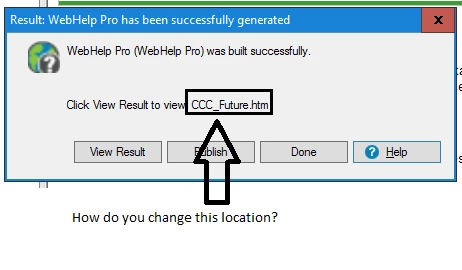
I am currently using Robohelp 2017.  I created a mirror image of my current project for a system conversion we are currently undertaking.  I want to publish the mirror image to our server using Webhelp Pro, but I want to change a setting that I don't know how to change.  My current project that I created the mirror image for when I publish using Webhelp Pro, it sends the output to "CCC_Future.htm".  My question is, how do change that output away from CCC_Future.htm so I can publish the mirror image of my project for training purposes, so that they don't both have the same output name?  I have looked everywhere in Robohelp and can't find how to do it.  I attached a screenshot of what I am looking to change. Please help!
 

This topic has been closed for replies.
Correct answer Jeff_Coatsworth

Are you actually using RH Server to host the output? That's the only reason why you would use WebHelp Pro.
Your output SSL (single source layouts) would have the path to the output directory.

1 reply

Jeff_Coatsworth
Community Expert
Jeff_CoatsworthCommunity ExpertCorrect answer
Community Expert
February 19, 2020

Are you actually using RH Server to host the output? That's the only reason why you would use WebHelp Pro.
Your output SSL (single source layouts) would have the path to the output directory.

OSBRobAuthor
Known Participant
February 19, 2020

Yes Jeff, we are using an RH Server to host the output.  I think I figured it out, I created a new Webhelp Pro output (SSL) and it changed the output location to the new name of my mirrored project.

johndaigle
Legend
February 19, 2020

If you fixed this, please ignore, but I would just add that you could also use the "Rename Project" command to change the name of the mirror project to something like CCC_Future_Training (or whatever) and that would then show up as CCC_Future_Training.htm in the dialog you displayed. Then you would create a new WebHelp Pro Layout to reflect the new project name.

Thanks
John Daigle

Adobe Certified RoboHelp and Captivate Instructor

1395 NE Newport Heights Dr. 
Newport, OR 97365


John DaigleAdobe Certified RoboHelp and Captivate InstructorNewport, Oregon