
Inspiring
April 9, 2019
Question

RH2017: External Sites in TOC Open in New Browser Window

  • April 9, 2019
  • 1 reply
  • 2419 views

I've created several TOC pages that link to remote URLs. I need these remote pages to open within the topic frame of the online help so the TOC is still available. After specifying the remote URL to which the TOC entry should point, I clicked the Advanced tab and selected Same Frame.
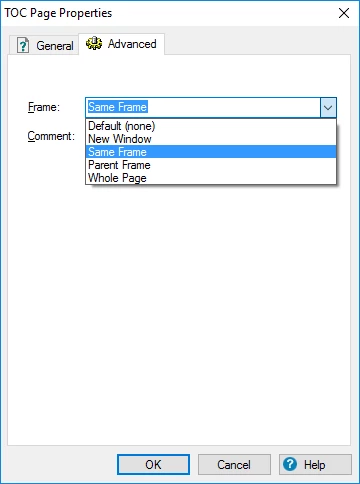
According to the RH2017 online help, selecting this option "Opens the topic in the same frame as the current topic." However, when I generate the project and click the TOC entries for these pages, the remote URLs open in a new browser tab/window instead of opening within the topic frame. Additionally, the HTML code for the <a href> in the TOC entry does not specify a target.

Is this is a bug (I recall being able to have remote URLs open within the help topic window previously), or is there something I'm overlooking in this process?

This topic has been closed for replies.

1 reply

Peter Grainge
Community Expert
Community Expert
April 10, 2019

I have just tested in both 2017 and 2019 and get the same result in both but not what you are getting.

In both cases I created a link to my website and then selected Same Frame as you have done. The site then opens in the TOC panel which is not surprising as that is the same frame.

With the setting left at Default, it opened in the topic area replacing what was there before. Try Default.

The idea of Same Frame is for cross topic links to force the topic to open in the same frame.


See www.grainge.org for free RoboHelp and Authoring information.

@petergrainge

Use the menu (bottom right) to mark the Best Answer or Highlight particularly useful replies. Found the answer elsewhere? Share it here.
Inspiring
April 10, 2019

Thanks for the response, Peter. If I leave the setting to Default, the remote URL opens in a new tab/window, not in the topic frame.

Captiv8r
Legend
April 10, 2019

Hi there

This would then seem to suggest a bug. But there is likely a workaround for it.

What you can do is to open the external URL via a redirect topic. This is a topic you create that RoboHelp thinks is part of the help system. But the HTML code of the topic simply redirects to the external link.

What you do is add the following to the statements in the HEAD area of the topic:

<meta HTTP-EQUIV=refresh CONTENT="0;URL=HTTP://www.SomeURLHere.htm">

Give that a go and see if it helps you accomplish your goal.

Cheers... Rick